
Primitives
Every map gets six building shapes of its own: a Block, a Cylinder, a Triangle (a wedge that rises to full height at one end, for ramps and slopes), a Hemisphere (a dome on a flat base), a Half Cylinder (a cylinder cut along its length, lying on its flat side) and an Equilateral Triangle (three equal sides, standing on one). Each comes in every combination of seven sizes along its sides, and in the sizes of ElDewrito's reforge pieces: 1,049 pieces to build floors, walls, towers, bridges, domes and whole maps from. They cost nothing.
- 0.25
- 0.5
- 1
- 2
- 4
- 8
- 16
Seven sizes along each side, in world units. A world unit is about 3 m, so a side runs from about 75 cm to 48 m. In these sizes a hemisphere's base is round and a half cylinder is half as high as it is wide.
Every shape also comes in the sizes of ElDewrito's reforge pieces, 167 of them, with sides of 0.09, 0.45, 0.9, 1.8, 2.7, 3.6, 4.5, 9 and 18 world units, including oval domes and flattened half cylinders. ElDewrito maps are rebuilt from them, and you can place them like any other size.
- Place oneOpen the Forge menu (1) and pick the Primitives category, or type a shape's name, such as "block" or "hemisphere". The line above Place sets the size, and the name shows it, such as "Block 1 × 2 × 4".
- Put it anywhereIt arrives with Physics set to Fixed, so it stays exactly where you release it, at any angle, even in mid-air. Set Physics to Normal to let it fall.
- Resize it in placeAim at it and press 1. Length, Width and Height (Diameter and Height for a cylinder, Side and Thickness for an equilateral triangle) change its size where it stands, turned the same way, with the same material, texture and properties. A held primitive stays held.
- Each size row lists every size the shape comes in along that side. A size that doesn't go with the other two, such as an ElDewrito size next to a grid one, gives you the piece of that size nearest along the others.
- Primitives are solid like the map's own Forge blocks, and take any material and passthrough like any wall. Domes and half cylinders wrap their texture around the curve, as a cylinder does.
- They save with the map, with their sizes, materials and textures, and keep them in every game type.
- Each size you use counts once toward the map's 240 kinds of objects, whatever its surface.
- The new shapes and sizes came in 0.8.14. The first time you play after updating, the game rebuilds its asset library once to add them.
Materials
Apply any material to a primitive with its Material property, then scale and slide its texture to fit.
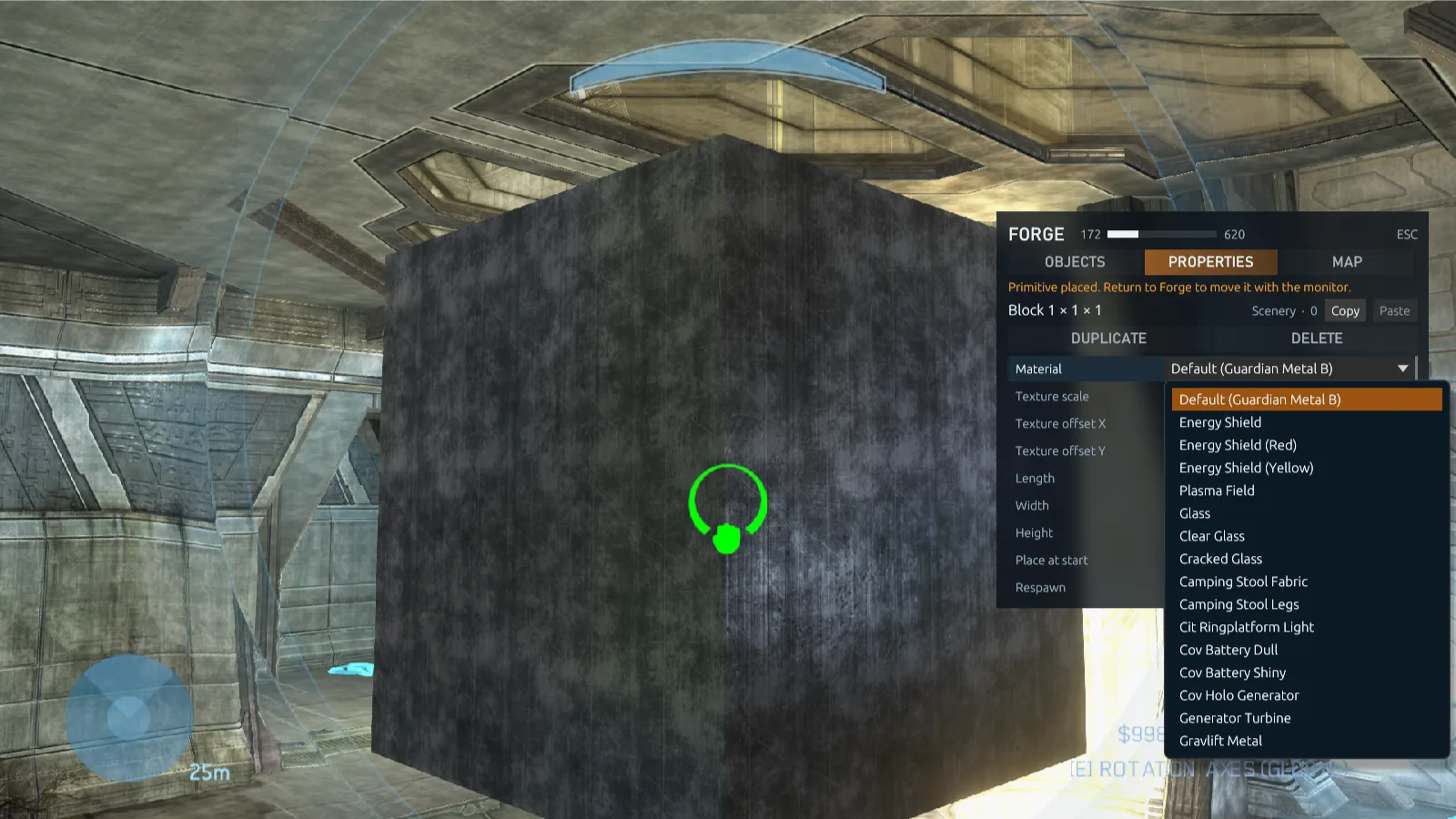
The map's surfaces
Every opaque surface of the map's structure and Forge objects, its floors, metals, walls and trims, then its own glass. One map offers 93.
Energy shields
A see-through wall of lightning in blue, red or yellow, or a bright, dense plasma field. On every multiplayer map.
Glass
A clear pane with a warm sheen, a fainter clear pane, or cracked glass with holes in it. On every multiplayer map.
Invisible
Hidden from players but still solid; monitors still see it. Make invisible walls, ceilings and ledges of your own.
Texture scale and offset
Texture scale sets how large one repeat of the texture is, from 0.1 to 16 world units. Texture offset X and Y slide it across the faces to line it up.
True to scale
By default a texture repeats once per world unit, so a surface looks the same on a 16-unit wall as on a quarter-unit step.
Shields and glass are see-through and blend over what's behind them, but a primitive stays solid whatever it looks like: set passthrough for a shield that players or vehicles cross. Default is the surface a new primitive gets on that map. Each map has its own list, up to 110 surfaces, taken from its own content; decals, holograms and lights are left out. Materials and textures save with the map and every player sees them.
Passthrough
Walls, blocks, crates, primitives and other scenery can let players, vehicles or projectiles through, each switched on its own. Mix them to build what the original Forge couldn't:
| Build | Players | Vehicles | Projectiles |
|---|---|---|---|
| Secret door | Pass through | Blocked | Blocked |
| Shield wall | Blocked | Pass through | Blocked |
| Fence you can shoot through | Blocked | Blocked | Pass through |
| Vehicle barrier | Pass through | Blocked | Pass through |
Pair it with a primitive's material: an Energy Shield that vehicles drive through looks the part, and an Invisible wall stops players who never see it, or lets their shots fly through.
- Players are everything on two feet: players, monitors and bodies.
- Vehicles are vehicles, driven or empty.
- Projectiles are bullets, grenades, rockets and every other projectile: they fly through instead of hitting.
- Everything else, such as dropped weapons and crates, still collides. Monitors can still aim at the object, pick it up and edit it.
- Open the object's propertiesAim at it, or pick it up, and press 1.
- Set what passesSet Players, Vehicles and Projectiles to Blocked or Pass through.
- Fix it in placeSet Physics to Fixed, or the object falls through whatever it lets pass. Primitives start fixed.
The setting saves with the map, and Duplicate, copy and paste keep it. Weapons, vehicles, equipment, teleporters and the Goals and Spawning objects don't have it.
Every map's objects
The Forge menu lists the objects of every installed multiplayer map, not only the map you're on. Place a vehicle, weapon or piece of scenery from any map on any other, then search, edit and save it like the map's own.
- Vehicles from other maps can be driven and ridden.
- The first time, the client collects every map's Forge objects into one library on your PC: about 340 MB, built in about half a minute. It's rebuilt when your installed maps or mods change, and once after each update. A mod map the game can't read is left out instead of stopping the build. Settings → Mods → Rebuild builds it again in the background, for example right after you turn a mod off or on.
- Saved maps remember which map each object came from. Players who join a game on your map need those maps installed; the game names any they're missing.
Campaign vehicles
The Vehicles category also lists three from Halo 3's campaign that no multiplayer map has: its two dropships and its giant walker. Place, move and save them like any other object.
- Dropships can be flown. They go where the pilot looks, and one carries two passengers at its rear hatch. Left alone they settle on the ground; set Physics to Fixed to keep one hovering where you placed it.
- The walker can be driven from the controls in its belly: walk it with the movement keys, steer where you look and fire its cannon. Players can walk on its deck. Its Drivable and Destructible properties set whether it can be driven and whether it can be destroyed.
- Every player has them: Project Reclaimer needs the campaign installed, so anyone can join a game that uses them. A dedicated server needs the campaign's
campaign.mapand040_voi.mapin itsgame/halo3/mapsfolder;dedicated initcopies them, anddedicated checksays whether they're there.
AI
The Forge menu's AI category places Halo 3's own AI. Each entry is a spawner: a Spartan or an Elite, or from the campaign a Marine, Grunt, Jackal, Brute, campaign Elite or Hunter. Its AI stands on the spawner in games and while editing, and fights players and other AI. Every player sees and fights it like any other unit, in games hosted by a player and on dedicated servers alike.
Team
Enemy of all, ally of all players, or a team color. In team games an AI on a color fights for that team; in free for all every color is a side of its own.
Shoots at
Everything, only infantry (players and AI on foot), or only vehicles.
Moves
Stands still and fights from its spot (the default), or moves within 3 to 40 units of the spawner, or anywhere: then it also charges, dodges and dives.
Weapon and respawn
Its own kind's weapon or one of 23 others, and how long after it dies it comes back, or never, for once a round.
- The spawner itself shows only while editing. Moving it, or changing its properties, places its AI again once the spawner stays put.
- AI never target monitors, so they don't get in the way of building.
- Multiplayer maps have no cover, patrol or search points, so AI hold their ground: they don't yet take cover, patrol or search for a player they lost.
- A dedicated server needs the same campaign maps as for the campaign vehicles, which
dedicated initcopies.
Kill and garbage volumes
Volumes are objects you place, shape and move like any other. Find Kill Volume and Garbage Volume under Goals, or search for "kill" or "garbage". In Forge they're drawn as red and green boundaries.
- Shape: box, cylinder or sphere, with width, length or radius, and how far it reaches above and below.
- Kill volume: kills every player inside, including players in vehicles, or only one team in team games.
- Garbage volume: removes dropped weapons, grenades, equipment, empty vehicles and bodies. Choose which, and whether they go at once or after 3, 10 or 30 seconds inside. Flags, balls and bombs are never removed.
- Visible: only in Forge, or always, so players can see them during games.
Volumes save with the map and work on listen hosts and dedicated servers alike.
Map boundaries
A Forge map can switch off two of its base map's boundaries, in the Forge menu's Map tab, so you can build and play beyond the original play area.
- Invisible walls: the walls and ceilings that push players, vehicles and monitors back into the play area, and the slopes they slide off.
- Out-of-bounds kills: the map's kill zones, everything outside its safe area, surfaces that kill after a few seconds, and on one map the automatic turrets that fire on players who wander out.
Only the host switches them. The choice saves with the map and applies to every game played on it, whatever the game type. Kill volumes you place still kill.
Skies
The Forge menu's Map tab has a Sky row that puts another installed multiplayer map's sky over the map you edit: Valhalla's over Guardian, say, or Sandtrap's over Foundry. The map's own puts its sky back.
- Choose one: open the list on the Sky row, or move to the row with ↑ and ↓ and step through the skies with ← and →. The new sky shows at once, for everyone in the game.
- The host chooses for everyone. Other editors see the host's choice on the row.
- Saved with the map: games on the map show the sky too, whatever the game type.
- Only the sky changes. The map keeps its own light and fog, so on a map with thick fog, such as Guardian, the fog hides much of a far sky.
- Skies come from the multiplayer maps you have installed, not from mods.
- Everyone editing with a host on 0.8.15 needs 0.8.15 or later, and so does everyone playing a map saved with another map's sky.
The Forge menu
In monitor mode, 1 opens Project Reclaimer's Forge menu in place of the original one: a compact panel on the right that leaves the view free. Everything in it works with the keyboard alone or the mouse alone. The title line shows how many objects are placed against how many the map can hold.
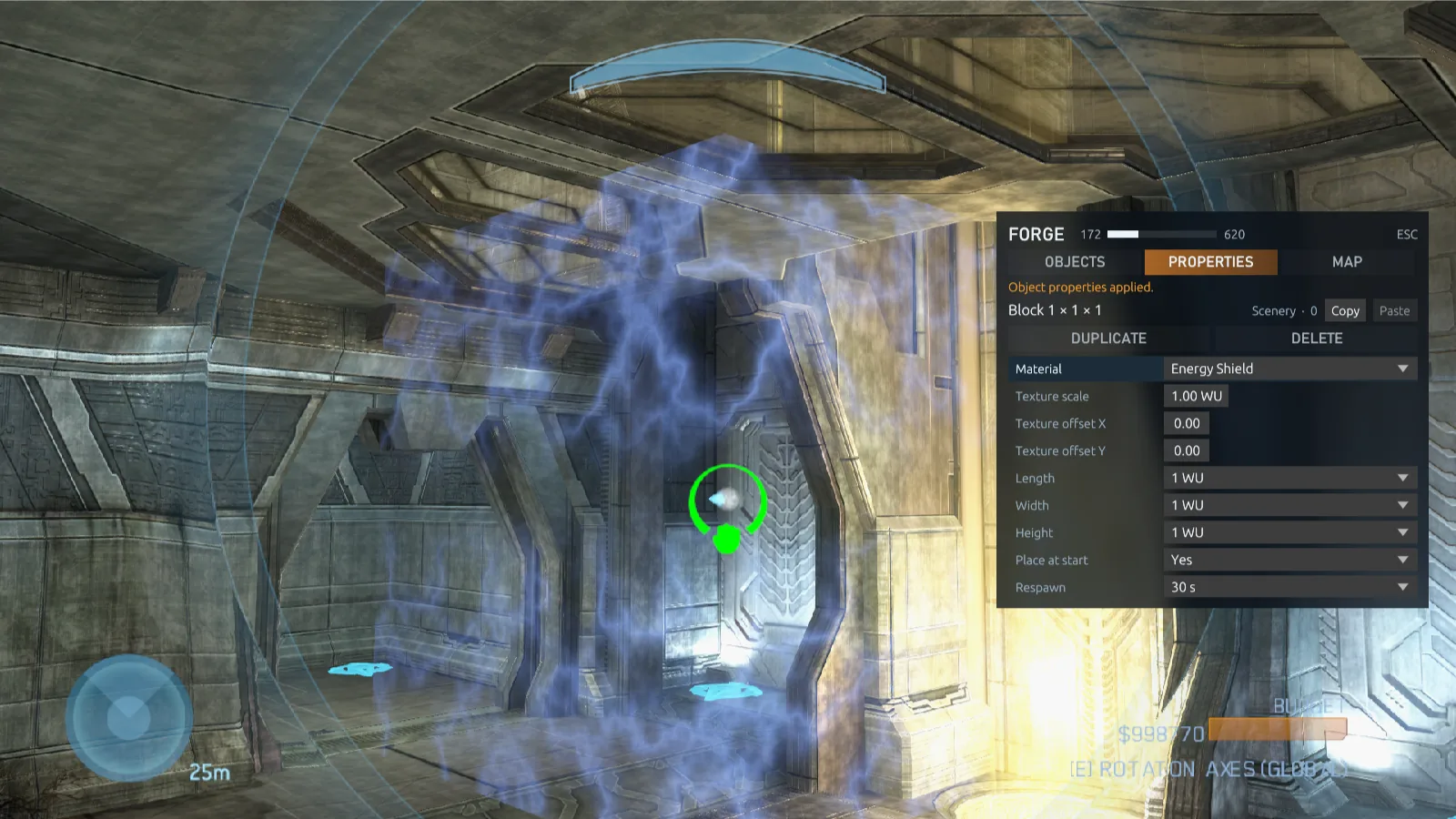
Objects
Start typing to search. Categories: All, Vehicles, Weapons, Equipment, Scenery, Teleporters, Goals, Spawning, Primitives and AI. Each row shows how many are placed, and a row of recent placements and copied properties sits on top. Placing closes the menu so you can grab the object at once; tick Keep (Ctrl+K) to stay. Clear removes every placement of the selected object, and Freeze all freezes every placement of it.
Properties
Aim at an object and press 1 to edit it without picking it up; picking one up opens this tab too. Rows include a primitive's material, texture and size, place at start, respawn time, symmetry, physics (normal, fixed or phased), passthrough, team, spare clips, teleporter channel, spawn order, zone shape and size, and the object's run-time minimum and maximum. Every change applies as you make it.
- Duplicate (D) places a copy with the same properties and rotation.
- C and V copy and paste properties between objects.
- Delete removes the object straight away.
- Freeze freezes scenery where it stands.
Map
The placed objects against how many the map can hold, the frozen objects against 5,000 and the kinds of objects against 240 (see object limits), the switch for freezing scenery when you let go of it, the map's boundaries and sky, and totals per category. Aim at a frozen object and open the menu, and this tab names it, with Unfreeze. It also shows where your monitor is and how fast it flies, with coordinates to teleport it to.
Precise rotation
- Hold Left Ctrl and move the mouse to turn the held object instead of the view. E switches between the map's axes and your view's.
- Rotation snap makes turns jump in steps of 5°, 15°, 30°, 45° or 90°. → and ← step it up and down.
- Yaw, Pitch and Roll in the Properties tab show the rotation in degrees. Step them or type a value.
- The middle mouse button stands the object upright again.
Push and pull
Halo 3 holds an object at most 10 units away, which puts the view inside anything large. Here you can hold it up to 100 units away.
- Scroll the mouse wheel up to push the held object away and down to pull it closer. Each notch moves it a fifth of its distance, so it goes far quickly and still moves finely up close.
- Holding Left Ctrl and moving forward or back does the same. With a controller, hold RT and push the left stick.
- Push object away and Pull object closer can also go on keys in Settings → Keyboard & Mouse; a held key moves the object steadily.
- The view stays behind the object as it moves, and it works the same for the host and for everyone editing with them.
Monitor speed and teleport
The monitor normally flies 2.5 world units a second. On a big map you can make it faster, and for fine work slower.
- Change speed: hold Move faster (Shift) and turn the mouse wheel: up for faster, down for slower. It steps from ×0.25 to ×16 the normal speed (×0.25, ×0.5, ×0.75, ×1, ×1.5, ×2, ×3, ×4, ×6, ×8, ×12, ×16), and the middle of the screen shows the new speed for a moment, such as MONITOR SPEED ×4. The speed stays until you change it, and Move faster's own boost still adds to it.
- Teleport: open the Forge menu's Map tab, which shows where your monitor is. Type X, Y and Z (each from −5,000 to 5,000) and select Teleport, or press Enter in a field. The monitor moves there through anything in the way. Here fills in where you are now, so you can note a spot and come back to it.
- Each editor flies at their own speed. In a game someone else hosts, the host needs 0.8.14 or later for your speed and teleports to work.
Frozen objects
A map has 640 placements, and its own objects take some of them: 191 on Guardian. Freezing lifts that limit for scenery. A frozen object stays exactly where it is, looks and collides the same and is saved with the map, but it no longer takes a placement or counts toward the 255 of its kind. A map keeps up to 5,000 frozen objects.
- Letting go freezes. Scenery you place with Fixed or Phased physics freezes as soon as you let go of it and it settles. Objects with Normal physics stay placements, since they can move. The Map tab's switch turns automatic freezing off.
- Grab to edit. Grab a frozen object and it's a normal object in your hands again, turned and set up as before; let go and it freezes again. Picking one up needs a free placement. Delete and copy work on frozen objects too.
- Freeze by hand. Freeze on the Properties tab freezes the object you're editing; Freeze all on the Objects tab freezes every placement of the selected object.
- Unfreeze. Aim at a frozen object and open the Forge menu: the Map tab names it, and Unfreeze makes it a placement again where it stands, without picking it up.
- Scenery only. Volumes, AI spawners, teleporters and anything a game type uses don't freeze. Freezing an object the map came with frees its slot only for a new object of the same type, once the map's other slots are full; see the map's own objects.
- Every game type. Frozen objects stand in every game type, not only in Forge. Before 0.8.14, a map whose primitives were all frozen could lose them outside Forge; they now show in every game.
Everyone in the game builds the frozen objects on their own PC, so they add nothing to Halo 3's network traffic, and they come back when a round resets the map. The game holds four times as many objects as Halo 3 did, so a map full of frozen objects still leaves players, weapons, vehicles, grenades and bodies all the room they had. Players need 0.8.10 or later to join a game on a map with frozen objects.
Object limits
Every Forge session, solo or with friends, runs with these limits. There's nothing to switch on.
| Limit | Value |
|---|---|
| Placements | 640 slots per map, including the map's own objects. Frozen objects don't take one. |
| Frozen objects | 5,000 per map, beside the placements. See frozen objects. |
| Per object | Up to 255 of every kind of object. Frozen objects don't count. |
| Kinds | Up to 240 different kinds of objects on one map. Each primitive size counts as one kind, whatever its surface. |
While you edit, the bottom-right of the HUD shows the two that fill up, where Halo 3's budget meter was: DYNAMIC OBJECTS, the placed objects against how many the map can hold, and STATIC OBJECTS, the frozen objects against 5,000. The Forge menu's Map tab shows both, and its title line the placed objects. There's no budget to keep to: objects have no price, and no map comes near Halo 3's.
When a limit is reached, the menu says so instead of placing an object that wouldn't be saved.
The map's own objects
The weapons, vehicles and scenery a map comes with take placements too: 191 of Guardian's 640. Delete or freeze one of them and its slot can hold a new object of the same type: a weapon for a weapon, scenery for scenery, a crate or block for a crate.
- New objects take the map's free slots first. Once those are full, the next object takes a freed slot of its type, and the placement count includes those slots.
- The map's object stays deleted when the map is saved, reloaded and played.
- Players need 0.8.15 or later to play a map that uses these slots.
Monitors and game options
- Invincible monitors: nothing you build, throw or knock over kills you while editing. The host can switch this in the pause menu; dedicated servers keep it on. Players in player mode take damage as usual.
- Every key rebindable: all Forge keys, like every other control, can be changed in Settings → Keyboard & Mouse, with two keys per action, and every controller button in Settings → Controller.
- World settings: Game Options → World & Forge sets player size from 25% to 300%, exposure and fog visibility for any game.
Start building
- Pick a mapIn Host Game, choose a map or one of your saved maps, and choose Forge as the game type.
- Solo or with friendsChoose Solo Forge to edit alone, or Start Game to let others join and edit with you.
- EditPress ` to switch between playing and editing, and 1 for the Forge menu.
- SavePress Esc and choose Save Map: Current map updates the file you opened, New map saves a copy. There's no autosave. The map keeps your nickname as its author, and the loading screen credits you whenever it's played.
- Play itYour map appears under Maps in Host Game. Pair it with any game type, add it to a playlist, or put it on a dedicated server.
Controls
These are the defaults. Change any of them in Settings → Keyboard & Mouse, or the controller's in Settings → Controller.
As the monitor
| Key | Action |
|---|---|
| ` | Switch between playing and editing |
| 1 | Open or close the Forge menu |
| W A S D | Fly where you look |
| R / F | Fly straight up / down |
| Shift | Move faster |
| Shift + mouse wheel | Make the monitor faster / slower (×0.25 to ×16) |
| Left mouse | Grab or drop the object under the crosshair |
| Right mouse | Zoom |
| Left Ctrl + mouse | Rotate the held object |
| E | Switch rotation axes (map or view) |
| → / ← | Rotation snap larger / smaller |
| Mouse wheel | Push the held object away / pull it closer |
| Middle mouse | Stand the held object upright |
| C | Clone the object under the crosshair |
| Delete | Delete the held object, or the one under the crosshair |
In the Forge menu
| Key | Action |
|---|---|
| Tab / Shift+Tab | Next / previous tab |
| ↑ ↓ | Choose an object or a row |
| ← → | Change a value, or the object category |
| Enter | Place the selected object |
| Ctrl+K | Keep the menu open after placing |
| D | Duplicate |
| C / V | Copy / paste properties |
| Esc | Close the menu |
With a controller
| Button | Action |
|---|---|
| D-pad up | Switch between playing and editing |
| X | Open or close the Forge menu. In it, the D-pad moves, A selects and B closes it. |
| A | Grab or drop the object under the crosshair |
| RB / LB | Fly straight up / down |
| LT | Move faster |
| RT held + look stick | Rotate the held object |
| RT held + left stick | Push the held object away / pull it closer |
| D-pad down | Switch rotation axes (map or view) |
| D-pad right / left | Rotation snap larger / smaller |
| Y | Delete the held object, or the one under the crosshair |
Mod objects
Mod maps give their Forge objects too. Every mod map in your Mods folder or Steam's Workshop folder adds its objects to the Forge menu, after the installed maps' own, with the mod's name in brackets since mods often reuse the original names. A mod you turn off in Settings → Mods gives none, from the next time the library is built.
- A saved map remembers which mod each object came from, and works in every game type.
- Players who join a game on it need those objects, not the host's other mods. A host that shares its mods packs just the objects the map uses, usually a few MB where the mod is hundreds, and sends them as players join.
- That object pack comes from the host's own copy, so it needs sharing turned on. Without sharing, players can still join by downloading the whole mod through the Steam Workshop.
- To host such a map on a dedicated server, put the mods in
content/Modsand turn on sharing. See mods on a dedicated server.
ElDewrito maps
ElDewrito's Forge maps and game variants convert themselves into Forge maps and game types of your own. There's nothing to run.
- Put the files inCopy ElDewrito Forge maps (
sandbox.map, usually in a folder named after the map) and game variants (variant.slayer,variant.zombiez,variant.ctfand so on) intoDocuments\My Games\Project Reclaimer\MapsorGame Modes. Either folder takes either, and subfolders are fine. - Start the game, or choose RefreshThe game converts them when it starts, or when you choose Refresh in Host Game's Map or Game Type picker. Each map becomes a Forge map in Maps and each game variant a game type in Game Modes, under its own name.
- Play or editPick the map in Host Game like any saved Forge map, with any game type, or open it in Forge to keep building.
Each file is deleted once it's converted, with any folder it leaves empty, so it's converted only once. Keep a copy elsewhere if you still want it for ElDewrito.
What a conversion keeps
- Reforge pieces become primitives of the same shape and size, where they stood. Materials MCC has no match for are drawn with the map's default surface.
- Objects MCC also has are placed where they were; objects it has no match for are left out.
- Game objects: spawn points, flags, bombs, hills, territories and teleporters keep their game types and teams, and kill and garbage volumes become kill and garbage volumes here.
- Frozen in place: pieces and scenery that never move, such as blocks, walls and rocks, are frozen where they stand, which leaves the map's placements to objects that move.
- Game variants keep their mode, name, author and settings: scoring, rounds, respawning, traits and powerups. Starting weapons that only ElDewrito has are left as the map's.
Objects that move can also take the slots of the base map's own objects that the ElDewrito map deleted (see the map's own objects). Since 0.8.15 that lets more maps convert: 858 of a collection of 1,025, up from 817.
A file that can't be converted stays where it is: its base map isn't one MCC has, it needs an ElDewrito mod, or it has more objects that move than its base map has room for. The game's log, Documents\My Games\Project Reclaimer\Logs\client.log, says why, and for every converted file what it left out.