
Start building
- Open a Forge lobbyChoose FORGE on the main menu. It opens the HOST GAME lobby with Forge as the game type. From another lobby, choose GAME TYPE, then Forge and USE FORGE.
- Pick a mapChoose MAP. The picker's Multiplayer tab lists every map, mod maps included, and the panel beside a map lists the maps saved on it. Its Campaign tab lists the campaign canvases.
- Alone or with friendsSet NETWORK to Local to keep the game on this PC, alone or in split screen, to LAN to open it to players on your own network, who find it in their server browser, or to Online to let anyone join and edit with you: up to 128 players, or 127 on a dedicated server, with Max players raised in HOST SETTINGS (see 128-player games).
- Choose what's on offerHalo 3's objects and the primitives are there from the start. FORGE OBJECTS in HOST SETTINGS adds other games' and mods' objects: see what each game offers.
- EditChoose START GAME. Press ` to switch between playing and editing, and X for the Forge menu. Controls has every key. Give the map spawn points.
- SavePress Esc and choose SAVE MAP. There's no autosave: see saving a map.
- Play itIn a lobby, choose MAP, pick the map you built on and choose your saved map in the panel beside it. Pair it with any game type, add it to a playlist, or put it on a dedicated server.
Spawn points
- Starting and respawn points are in the Spawning category. You can grab and move them, the map's own included. A player's first life uses a starting point when there is one, and every later life a respawn point.
- Teams. A team's points are for that team only: a team with starting or respawn points of its own spawns only at those. A team with none of its own uses the neutral ones, and a team without starting points of its own starts at its respawn points. Give every side enough points of its own.
- Team colors. While you edit, points set to a team are drawn in the team's color and neutral ones in grey, on every game's maps, Halo: Reach's included. AI spawners show their team's color too, grey for Enemy of all and white for Ally of all players. Team also offers Team 9 to Team 64, for script modes that declare more teams.
- Infection. Red points are for survivors, Blue points for the infected and Neutral points for a side with none of its own. Other objects' team settings follow the same sides: see teams in Infection.
- AI spawners are never spawn points. A player whose team has no starting or respawn point left never spawns on an AI spawner, in any game type, on maps saved before as well.
- Sides. Which team plays the Red side and which the Blue follows Halo 3: in Slayer-type games the first round gives the sides at random, and the teams swap sides every round. Free-for-all games play as in Halo 3.
Default variants' respawn points, in HOST SETTINGS, is on by default. A Halo 3 map played as it ships, with no saved map, gets the extra spawns of Bungie's matchmaking default variant for it: 27 respawn points on Narrows, 29 on High Ground and 8 Slayer respawn zones on Orbital. Nothing else on the map changes. They're there in Forge too, as ordinary objects you can move or delete. Off plays the maps as they ship. Saved maps and mod maps always play as they are. On a dedicated server the setting is stock_map_defaults.
Saving a map
Press Esc for the game menu and choose SAVE MAP. It opens a page of its own over the game. There's no autosave, so save before you leave.
- MAP NAME holds up to 48 characters. DESCRIPTION is one optional line, which the map picker shows.
- Where it goes: OVER your map replaces the file you opened, and AS A NEW MAP leaves it as it is. A map with no file of yours, such as a map as it ships, can only be saved as a new map.
- On the right are the map's picture and what it holds: its objects, their kinds, and what Players who join need, such as Halo 3: ODST or a mod.
- Keys: ↑ and ↓ walk the fields and the two ways to save, Enter saves from anywhere, and Esc or BACK goes back to the game menu. With a controller, the D-pad, A and B do the same.
Whoever saves a map is its author, and the loading screen credits them whenever it's played. After a save, the lobby switches to the map you saved, so the next game you start from it plays your latest save.
Nowhere to respawn
In Halo 3, a map with every spawn point deleted leaves players waiting for ever. Here it can't catch you out.
- While you edit, the game notices when a player on this PC has no starting or respawn point left. SAVE MAP then asks SAVE WITHOUT RESPAWN POINTS? with CANCEL and SAVE ANYWAY, and the confirmations for LEAVE FORGE and EXIT GAME start with the same warning.
- In a game, two seconds in, if a player has nowhere to spawn, the host places neutral respawn points at the map's own player starts, up to 16. They're ordinary objects: in Forge you can move or delete them, and they stay only if you save the map.
- As a last resort a player with nowhere to spawn appears at the first of the map's player starts with room.
- A player who has other objects to spawn at, such as a neutral flag stand, spawns on them as in Halo 3, and nothing is given back. A campaign canvas played outside Forge keeps the spawns its creator saved.
Where maps are kept
Saved maps are files in the Maps folder of your player folder:
| System | Maps folder |
|---|---|
| Windows | %LOCALAPPDATA%\ProjectReclaimer\Maps |
| macOS | ~/Library/Application Support/ProjectReclaimer/Maps |
| Linux | ~/.local/share/ProjectReclaimer/Maps (or under $XDG_DATA_HOME) |
Maps saved in 0.9 carry over. They move with the rest of your player folder on the first start, and there's nothing to convert. Their frozen objects open as ordinary objects, with the same materials, sizes and positions. Players who join need 0.10 as well: 0.9 and 0.10 can't play together.
Object limits
Every Forge session, alone or with friends, runs with these limits. There's nothing to switch on, and there's one number to watch: Objects.
| Limit | Value |
|---|---|
| Objects | 9,999 on a map, the map's own included. Sandbox starts at 331. |
| Of one kind | No limit. Halo 3's cap on each kind of object is gone. |
| Kinds | No limit you'll reach: a map can use everything in the palette. |
| Budget | None to keep to. Objects from other maps and primitives are free, and no map comes near the budget of 1,000,000 for the rest. |
| The game's objects | 16,320 at once, for everything in the game. 2,048 of them are kept for players, weapons, projectiles and the like, which leaves 14,272 for what you place. |
While you edit, the bottom-right of the HUD shows OBJECTS with a meter, such as 331 / 9,999. The line under the Forge menu's tabs shows the same count, such as 331 OF 9,999 OBJECTS, with a thin meter that turns gold when the map is nine-tenths full.
When a map fills up
An object takes more of the game's 16,320 than its own place. A still block takes one. A vehicle brings its turrets and weapons: a Ghost takes 3, a Warthog 5, a Scorpion or Wraith 6, a Phantom 9 and a Scarab 12. The first few thousand objects that aren't still also get an editor's marker, which takes one more. So 9,999 Fixed blocks fit, and a map of nothing but vehicles runs out sooner. When that's what stops you, the second number in the count drops below 9,999 to show how many the map can really hold.
- Map placement limit reached: every slot on the map is taken.
- The game has no room for more objects: the game's own room is what ran out.
- The map has room for N more objects: a copy or a prefab won't fit whole, so nothing is placed.
The game says so instead of placing an object that wouldn't be saved. C and Place copies make at most 4,096 objects at a time.
What a big map costs
Still objects are cheap and objects that move aren't. These are measurements from one Apple Silicon Mac, with host and joiner on the same machine. Your hardware will differ, and Windows and Linux haven't been measured.
| Map | Frame rate |
|---|---|
| 9,000 Fixed barriers on Guardian | 60 frames a second, on the host and the joiner |
| 2,600 objects with Normal physics | About 23 on the host while they fall, then 50 to 60 |
| Stress test: 9,999 blocks dropped from the air on Sandbox, then a fight with 127 bots | 3 to 5 for about 15 seconds after the drop, then about 17 |
So set everything that doesn't need to move to Fixed or Phased, and keep objects with Normal physics to the ones that do. The stress test is a worst case on purpose. One of its nine runs stopped drawing frames altogether. A freeze in very big piles of objects has since been fixed, and is the likely cause.
- Placed objects that stay put cost almost nothing each tick. The game remembers which ones are already where they belong and looks again only at the ones that changed, so a map with thousands of placed blocks stays quick to edit and to play big games on.
- Fire and explosions find the objects around them cheaply on maps with thousands of objects, so maps that use many fire objects keep their tick rate.
- Every vehicle, weapon and movable block respawns, up to the map's 9,999, and each spawn keeps to its one object.
- A custom game on a saved map loads only what the map places, not the whole palette, which saves many seconds on a map with other games' objects. Scripted modes, which may create any object, still get every Forge object: Megalo modes, Halo: Reach's game variants and Firefight.
- Joiners see the map whole: a joined map's placed objects are made while the loading screen is up.
Loose objects stay. A map keeps its objects with Normal physics, up to the full 9,999. A pile too big to work out goes to sleep whole, where it stands, so blocks can stop in mid-collapse. It stays awake while a vehicle with someone in it, a creature, a projectile or something held is in it. In our tests 9,668 blocks dropped over Sandbox all stayed, on the host and the joiner. A block pushed out of the map still goes, and comes back after its respawn time.
The map's own objects
The weapons, vehicles and scenery a map comes with are objects too, and count toward the 9,999. Delete one and the count falls, and it stays deleted when the map is saved, reloaded and played. New objects take the map's free slots first. On a map with no free slots left, a deleted object's slot can still take a new object of the same type: a weapon for a weapon, scenery for scenery, a crate or block for a crate.
Objects that hold still
Earlier versions split a map into placements and frozen objects. That split is gone: there's no Freeze or Freeze all, nothing freezes when you let go, there's no green reticle, and the HUD has one count. Every object is the same to you. Grab it, edit it, copy it or delete it.
Behind the scenes, the game treats objects that hold still as cheaply as it can. An object counts when it's scenery or a crate, has Fixed or Phased physics, isn't used by a game type (a spawn point or a flag stand, say), has no Megalo label, and nobody is holding it.
- How joiners get them. Each PC builds such an object itself. The host sends every player a compact list of them, and sends the changes as you edit. Every 15 seconds each PC checks its list against the host's and puts right any difference. Someone who joins late gets the whole list.
- What moves is sent as usual. Everything else goes over the network like any object in Halo 3, which is why a map full of objects with Normal physics costs more.
- They're there in every game. They stand in every game type, a new round puts them back with the rest, and films record them.
A few help lines in the Tools tab still say “frozen ones included”. Read that as every object. A map saved in 0.9 opens with its frozen objects as ordinary ones.
Building with friends
Everyone in a Forge session edits the same map, and every change goes through the host. Allow editing in the Forge game type's Game Options says who can edit: Everyone or Host only.
- The same map on every PC. Objects with Fixed or Phased physics stand exactly where the host has them, so pieces that meet on the host show no seams on anyone else's PC. Loose objects at rest stay where the host has them too, to well under a centimeter in most cases, instead of settling or toppling on joiners alone.
- Joining late. Someone who joins a session in progress gets every object, volume and light as it stands, and can edit at once.
- Holding. A joined editor grabs and lets go of the right object at every slot up to 9,999. A held object stays put for everyone until its holder moves it, and an object placed after you joined shows in your Forge menu too.
- Selections are each editor's own. A move, copy or edit of a selection goes through the host, and a selection of more than 4,096 objects still moves, changes or goes in one action.
- Your monitor is yours: your PC decides where it is, so on someone else's server it stays where you fly it at every speed.
- Split screen. Each player has their own Forge keys and controller, their own selection, and the Forge menu in their own view.
Primitives
Every map gets six building shapes of its own: a Block, a Cylinder, a Triangle (a wedge that rises to full height at one end, for ramps and slopes), a Hemisphere (a dome on a flat base), a Half Cylinder (a cylinder cut along its length, lying on its flat side) and an Equilateral Triangle (three equal sides, standing on one). Each comes in every combination of seven sizes along its sides, and in the sizes of ElDewrito's reforge pieces: 1,049 pieces to build floors, walls, towers, bridges, domes and whole maps from.
- 0.25
- 0.5
- 1
- 2
- 4
- 8
- 16
Seven sizes along each side, in world units. A world unit is about 3 m, so a side runs from about 75 cm to 48 m. In these sizes a hemisphere's base is round and a half cylinder is half as high as it is wide.
Every shape also comes in the sizes of ElDewrito's reforge pieces, 167 of them, with sides from 0.09 to 18 world units, including oval domes and flattened half cylinders. ElDewrito maps are rebuilt from them, and you can place them like any other size.
- Place oneOpen the Forge menu (X) and set CATEGORY to Primitives, or type a shape's name, such as "block" or "hemisphere". Each shape is listed once. The rows under the list set its size, and the name shows it, such as "Block 1 × 2 × 4".
- Put it anywhereIt arrives with Physics set to Fixed, so it stays exactly where you release it, at any angle, even in mid-air. Set Physics to Normal to let it fall.
- Resize it in placeAim at it and press 2 for its Properties. Length, Width and Height (Diameter and Height for a cylinder, Side and Thickness for an equilateral triangle) change its size where it stands, turned the same way, with the same material, texture and properties. A held primitive stays held, in its new size.
- Each size row lists every size the shape comes in along that side. A size that doesn't go with the other two, such as an ElDewrito size next to a grid one, gives you the piece of that size nearest along the others.
- Primitives are solid like the map's own Forge blocks, and take any material and passthrough like any wall. Domes and half cylinders wrap their texture around the curve, as a cylinder does.
- They save with the map, with their sizes, materials, colors and textures, and keep them in every game type.
- A primitive never goes away, so its Properties have no Respawn or Place at start rows.
- Project Reclaimer primitives in FORGE OBJECTS is on by default. Turned off, the primitives leave the palette, and the catalogue of other maps' materials goes with them.
Materials
Give a primitive any material with its Material row, then scale and slide its texture to fit. Clicking the row, or pressing Enter on it, opens a picker with a picture of each.
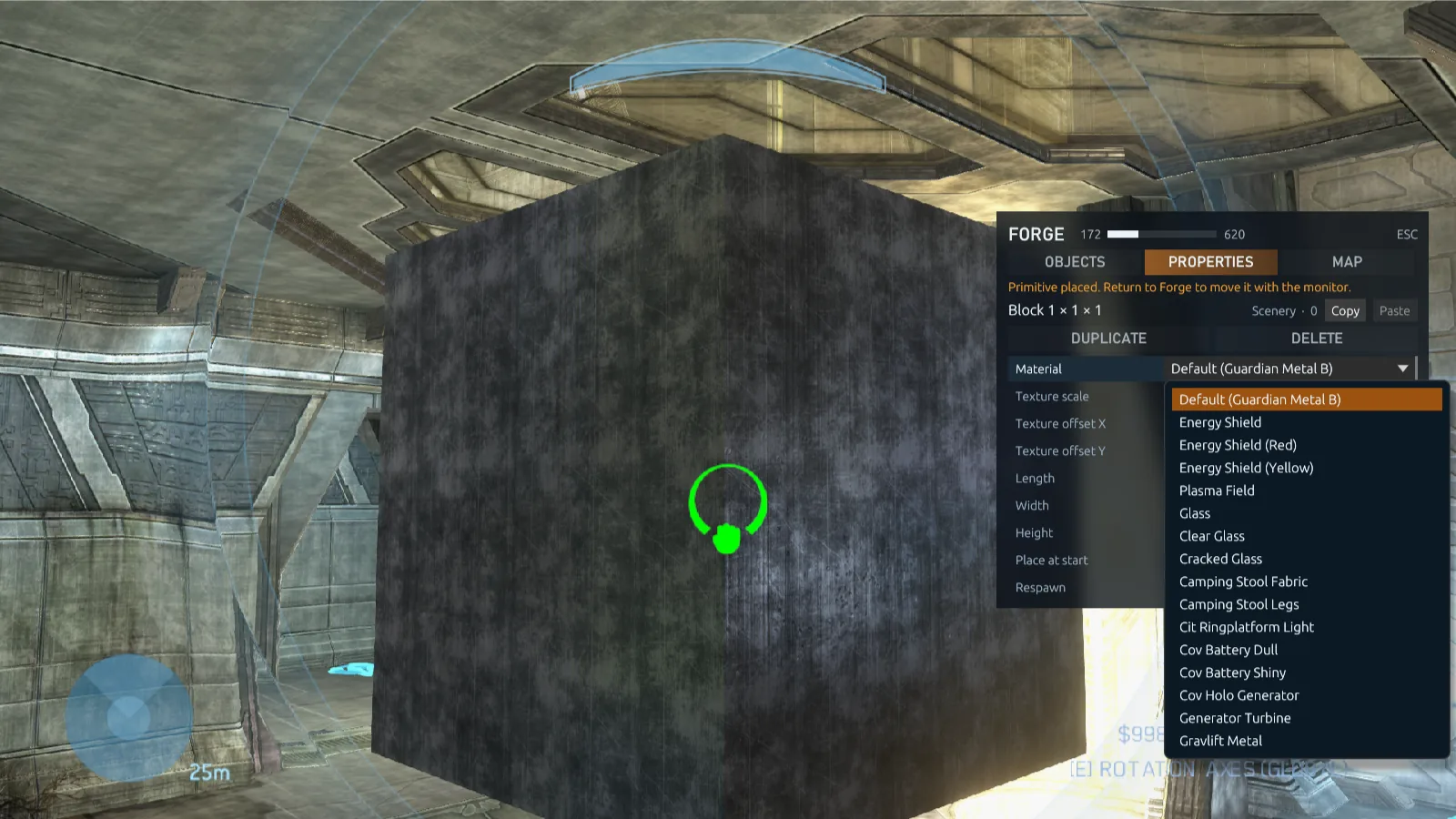
The map's surfaces
Every opaque surface of the map's structure and Forge objects, its floors, metals, walls and trims, then its own glass, up to 110 of them. Decals, holograms and lights are left out.
Other maps' surfaces
A catalogue of 193 surfaces from 25 multiplayer maps, on every map: Valhalla's rock, Snowbound's snow, Covenant and Forerunner metals and more. See other maps' materials.
Energy shields
A see-through wall of lightning in blue, red or yellow, or a bright, dense plasma field. On every multiplayer map.
Glass
A clear pane with a warm sheen, a fainter clear pane, or cracked glass with holes in it. On every multiplayer map.
Invisible
Hidden from players but still solid; monitors still see it. Make invisible walls, ceilings and ledges of your own.
Texture scale and offset
Texture scale sets how large one repeat of the texture is, from 0.1 to 16 world units. Texture offset X and Y slide it across the faces to line it up. By default a texture repeats once per world unit, so a surface looks the same on a 16-unit wall as on a quarter-unit step.
Shields and glass are see-through and blend over what's behind them, but a primitive stays solid whatever it looks like: set passthrough for a shield that players or vehicles cross. Default is the surface a new primitive gets on that map. Materials and textures save with the map and every player sees them.
Other maps' materials
A primitive on any map can be drawn with other maps' surfaces, as ElDewrito's materials work on every map. The catalogue holds 193, such as Valhalla's rock, Sandtrap's sandstone, Snowbound's snow and ice, Last Resort's seawall, Standoff's bunker concrete, the Covenant metals of Midship and the Forerunner metals of every Forerunner map, and a plain grey for ElDewrito's default grid. A map takes all that fit beside its own content: 189 on Guardian, 187 on Sandbox.
- Open its propertiesAim at the primitive, or pick it up, and press 2.
- Open the material pickerClick Material, or press Enter on it. The picker opens beside the menu with a picture of every material the primitive can take.
- Pick oneChoose a category: This map for the map's own surfaces, Special for Default, the energy shields, plasma field, glass and Invisible, then other maps' surfaces by kind, from Concrete and Metal, Human to Rock & Ground, Snow & Ice and Wood. All shows everything, Recent holds the last 12 you chose, and the search box finds a material by its name or its map's. Click one to give it to the primitive.
- ← and → on the Material row step through every material without the picker, so the keyboard alone can reach them all.
- Forge loads all of them while you edit, so any can be chosen. A game on a saved map loads only the ones its primitives use.
- Imported ElDewrito maps get the nearest of these surfaces for each of their materials.
Material color
A primitive can take any color, like ElDewrito's reforge pieces.
- Open its propertiesAim at the primitive, or pick it up, and press 2.
- Pick a colorOpen the swatch on the Material color row for a color picker, or set Red, Green and Blue from 0 to 255. ← and → step the chosen one by 5.
- Or go backDEFAULT gives the material its own color again.
- Each piece keeps its own color, even next to another piece with the same shape and material.
- The color stays through texture edits, resizing and clones, saves with the map, and every editor and joining player sees it.
- With several primitives selected, APPLY TO N SELECTED paints them all.
- ElDewrito maps keep the colors of their Glossy, Matte, Glass Colored and Glass Emissive pieces.
Passthrough
Walls, blocks, crates, primitives and other scenery can let players, vehicles or projectiles through, each switched on its own. Mix them to build what the original Forge couldn't:
| Build | Players | Vehicles | Projectiles |
|---|---|---|---|
| Secret door | Pass through | Blocked | Blocked |
| Shield wall | Blocked | Pass through | Blocked |
| Fence you can shoot through | Blocked | Blocked | Pass through |
| Vehicle barrier | Pass through | Blocked | Pass through |
Pair it with a primitive's material: an Energy Shield that vehicles drive through looks the part, and an Invisible wall stops players who never see it, or lets their shots fly through.
- Players are everything on two feet: players, monitors and bodies.
- Vehicles are vehicles, driven or empty.
- Projectiles are bullets, grenades, rockets and every other projectile: they fly through instead of hitting.
- Everything else, such as dropped weapons and crates, still collides. Monitors can still aim at the object, pick it up and edit it.
- Open the object's propertiesAim at it, or pick it up, and press 2.
- Set what passesSet Players, Vehicles and Projectiles to Blocked or Pass through.
- Fix it in placeSet Physics to Fixed, or the object falls through whatever it lets pass. Primitives start fixed.
The setting saves with the map, and duplicates and copied properties keep it. Weapons, vehicles, equipment, teleporters and the Goals and Spawning objects don't have it.
Team barriers
A wall players pass through can let only one team through, as in ElDewrito 0.7: once Players is set to Pass through, choose a team under Players of, such as Red only for the door of the red base. The other teams' players are stopped as by any wall; vehicles and projectiles follow their own rows. Any team lets everyone through. A team barrier only tells teams apart in team games: in free-for-all games, and in Forge, everyone passes. A barrier can also be for Team 9 to Team 64, for script modes that declare more teams.
Every map's objects
Forge works on every installed game's multiplayer maps, Halo: Reach's, Halo: Combat Evolved's and Halo 2's included, each with its own game's objects. The Forge menu lists the objects of every installed multiplayer map, not only the map you're on. Place a vehicle, weapon or piece of scenery from any map on any other, then search, edit and save it like the map's own. Vehicles from other maps can be driven and ridden. Combat Evolved's scenery can be picked up and moved like any other object, and other games' weapons, vehicles and scenery keep their own sounds on the map you put them on.
Saved maps remember which map each object came from. Players who join need those maps installed, and the game names any they're missing before the map starts.
What each game offers
Every object comes from one source, and the list in the Forge menu tags each row with it: HALO 3, ODST, another game's name, a mod's title or RECLAIMER, in gold for what players who join may lack. The FROM row filters the list by source. FORGE OBJECTS, in a Forge lobby's HOST SETTINGS, says what's in the palette and what joiners will need.
| Source | In the palette | Players who join need |
|---|---|---|
| Halo 3's objects on a Halo 3 map | Always on: every multiplayer map's objects, the campaign vehicles and the AI spawners | Nothing extra |
| Primitives | On by default, with a switch | Nothing extra |
| Halo 3's objects on an ODST canvas | On by default, with a switch | Nothing extra |
| ODST's objects on a Halo 3 map | Off by default, with a switch; on by itself for a saved map that places them | Halo 3: ODST installed |
| ODST's objects on an ODST canvas | Always on | Halo 3: ODST installed |
| Reach's, Combat Evolved's or Halo 2's objects on that game's own maps | Always on | That game installed |
| Reach's, Combat Evolved's or Halo 2's objects on another game's map | Off by default, with a switch for each game | That game installed |
| A mod's objects | Off by default, with a switch for each mod turned on; always on for a mod map's own mod | That mod, which they download as they join |
- The list in FORGE OBJECTS starts with what joiners need: Players who join need nothing extra., or the games and mods by name. A row shows ALWAYS ON for the map's own game or mod, ON · USED BY THIS MAP for a source a saved map places, and NOT INSTALLED for ODST without it.
- A change applies to the next game, played alone or hosted.
- Only Forge's palette takes these choices. Another game type on a saved map takes what the map places, whichever source it comes from.
- Starting weapons take a source too. In Game Options, each trait set's starting weapons have a Primary weapon source and a Secondary weapon source: leave them on the game type's own, or choose a game or a mod to start with that source's version of a weapon, a different source for each hand if you like. A saved game type keeps the choices.
- A dedicated server sets them with
odst_objects,reach_objects,halo1_objects,halo2_objects,halo3_objects,forge_modsandforge_primitives.
Halo 3: ODST's objects
With ODST installed, turn on Halo 3: ODST in FORGE OBJECTS to add its 17 objects to a Halo 3 map: health packs and ammunition, the standalone turrets, the drop pod, the Olifaunt, the Vidmaster rocket launcher, and city scenery such as a civilian car, phone booths, kiosks, barriers, streetlights and crates. That game then needs ODST: the server browser shows NEEDS ODST, and players without it are told before they connect. Left off, players without ODST join as usual.
The asset library
The game finds every object once and keeps an index of them, in shelves: one for Halo 3, one for each other installed game (ODST, Halo: Reach, Halo: Combat Evolved and Halo 2), and one for each mod. It holds no game data. When a game starts, the objects are read from your own map files and merged in memory.
- First start: the loading screen says BUILDING ASSET LIBRARY, with a bar for the current step, until every shelf is built: Halo 3's, each other installed game's and every installed mod's. Nothing goes on building behind the main menu. On our test Mac every installed game's shelf together took under a minute: Halo 3's about 8 seconds, ODST's 2, Halo: Reach's 14, Combat Evolved's 3 and Halo 2's about 22. Later starts reuse what was built.
- Mods: a mod that reaches your PC later gets its shelf then, a second or two for each of its maps. Turning a mod on or off needs no rebuild. A mod map the game can't read is left out, and its row in Settings → Mods says why.
- Maps of shared tags: a mod can keep its weapons, vehicles, equipment, scenery and crates in a map that is never listed to play (in the Reclaimer Kit, Tags only (content for other maps) before Compile Map). Its shelf offers everything such a map adds, each object named after its tag. Turn the mod on in FORGE OBJECTS to place them on any map.
- Maps that share a file name each keep their own objects: Halo: Reach's Forge World and a mod's port of it, or two mods' maps of one name, sit side by side in the palette, and a saved map remembers which one each object came from.
- Afterwards a shelf is built again only when its maps change, such as after an MCC update. Updating Project Reclaimer keeps the shelves, unless the update changes what a shelf holds: then that shelf is built once more.
- Settings → Mods → ASSET LIBRARY says what's built and how big it is, and REBUILD builds every shelf again. Use it from the menus: it isn't offered in a lobby or a game.
- Loading a Forge game takes a little longer than a plain game, while the lobby says GETTING THE MAP READY: the whole palette is merged into the map, about five seconds on our test Mac, and other games' objects add a few more. Each of Combat Evolved's and Halo 2's maps is prepared only for the objects the palette takes from it.
- When the palette is more than one map holds, such as with Halo 3's, ODST's, Reach's and Halo 2's objects all on, the map keeps what fits: what a saved map places first, then the AI spawners, with the primitives last. The rest is left out of the palette, and the game says how many objects of which map were left out because the map is full. A map holds up to 65,535 resources (textures, models, animations and sounds), so Halo: Reach's Forge World takes Ultimate Forge 2.0's and ODST's objects together.
- Joiners download no game data. The host sends a short recipe, and each player's game makes the same map from their own files and checks that it matches. Only a mod a player lacks is downloaded.
Campaign vehicles
The Vehicles category also lists three from Halo 3's campaign that no multiplayer map has: the Phantom and Pelican dropships and the Scarab walker. Place, move and save them like any other object.
- Dropships can be flown. They go where the pilot looks, and the Pelican carries two passengers at its rear hatch. Left alone they settle on the ground; set Physics to Fixed to keep one hovering where you placed it. A vehicle set to Fixed or Phased stays where you let go of it instead of falling.
- The Scarab can be driven from the controls in its belly: walk it with the movement keys, steer where you look and fire its cannon. Players can walk on its deck. Its Drivable and Destructible rows set whether it can be driven and whether it can be destroyed.
- They come from your own campaign files, so players who join need nothing extra. A dedicated server needs the campaign's
campaign.mapand040_voi.mapin itsgame/halo3/mapsfolder;dedicated initcopies them, anddedicated checksays whether they're there. - They aren't offered on campaign canvases.
Campaign canvases
The Campaign tab of the lobby's map picker lists every playable area of your installed campaign missions, of every installed game, each as its own map marked (Campaign Canvas), such as “Sierra 117 · Chief Crater (Campaign Canvas)”. A canvas keeps the area's terrain, buildings, collision, sky and lighting, and leaves out everything else: the mission's placed objects, weapons, vehicles, doors and AI, its spawn points, scripts and triggers, cutscenes and its kill zones. Objects that are part of the level's geometry stay.
- Pick an areaIn a Forge lobby, choose MAP, the Campaign tab and a canvas. A mission whose areas load one after another gives one canvas per area.
- Add what a game needsA fresh canvas has no spawn points or objectives, so you enter at the area's own start. Place starting points, respawn points, weapons and objectives from the Forge menu.
- Save and playSave the map, then play it from HOST GAME with any multiplayer game type. A saved canvas keeps its mission and area, and opens on the area it was made on.
- What's offered: every installed multiplayer map's objects and the primitives, in every area of a mission. Campaign vehicles, AI spawners, mods' objects and other maps' skies aren't in a canvas's palette, to keep its memory free for the area.
- Joiners build the canvas from their own campaign files; nothing from the campaign is changed or sent to anyone. They need the same mission installed.
- Playlists and dedicated servers take ODST's canvases only. A Forge entry names one by its file name, such as
{ "map": "canvas_sc100_z0", "game": "Forge" }, anddedicated contentlists them. The other games' canvases play from a player's own HOST GAME lobby. - Big canvas maps keep every object: a map built on a canvas holds its weapons and vehicles past 640 objects too.
- Films of games on a canvas play back in Theater.
- Mods' campaigns aren't offered as canvases, only the games' own missions.
- The Reclaimer Kit opens canvases and the Forge maps built on them, too.
ODST canvases
With Halo 3: ODST installed, its missions' areas are listed in the same tab, and their first listing takes a few seconds while the game reads them. An ODST canvas draws as ODST does, with its own plants and water.
- Its palette has ODST's 17 objects, always, and Halo 3's multiplayer objects and the primitives, on by default: about 1,400 in all. Turn Halo 3 off in FORGE OBJECTS to leave Halo 3's out.
- Every player needs Halo 3: ODST. A player without it is told so when joining, and a saved map on an ODST canvas won't open on a PC without it.
Combat Evolved, Halo 2 and Reach canvases
Every area of every mission of Halo: Combat Evolved, Halo 2 and Halo: Reach is a canvas too. In the map picker, choose the game, then its Campaign tab: each area is listed as “Mission · area (Campaign Canvas)”. Pick one, choose Forge and start.
- A canvas plays as a map of its own game: that game's players, HUD and rules, and that game's objects in Forge's palette. On Combat Evolved's and Halo 2's canvases the palette is the mission's own vehicles, weapons, equipment and scenery.
- It starts empty, like every canvas: nothing of the mission is placed, and Forge enters at the area's start. Place spawn points and save the map to play other game types on it.
- Friends can join when they have the same game installed.
- Halo 2's canvases play by Halo 3's game rules for now.
- Reach's canvases show no picture in the map picker or on the loading screen yet.
AI
The Forge menu's AI category places AI. Each entry is a spawner: its AI appears on the spawner in games and while editing, and fights players and other AI as its character does in its campaign: it moves, takes cover, searches for and pursues its enemies, flanks, retreats and, in a vehicle, fights from it. The host works out where AI can walk from the map itself, so there's nothing to set up. Every player sees and fights them like any other unit, in games hosted by a player and on dedicated servers alike.
| From | Spawners | Offered |
|---|---|---|
| Halo 3 | Spartan, Elite (Multiplayer), Master Chief (Campaign), Marine, Marine (Female), Marine Sergeant, ODST, Grunt, Grunt (Heavy), Jackal, Jackal Sniper, Drone, Brute, Brute (Jump pack), Brute Captain, Brute Stalker, Brute Chieftain, Brute Chieftain (Armour), Elite, Elite Spec Ops, Hunter and four Flood forms | Wherever Halo 3's objects are offered |
| Halo 3: ODST | ODST, Buck, Dare, NMPD Officer, NMPD Sergeant, Drone Captain and the flak-cannon Hunter | With ODST installed |
| Halo: Reach | Troopers, Spartans, Elites, Grunts, Jackals, Skirmishers, Brutes, Hunters and Drones | With Reach's objects on in FORGE OBJECTS |
| Halo: Combat Evolved | A Marine, a crewman, Elite Minors, Majors, Zealots and stealth Elites, Grunt Minors and Majors, a Jackal and a Hunter | With CE's objects on, and always on CE's own maps |
| Halo 2 | Marines, ODSTs, Elites, Brutes, Grunts, Jackals, Hunters and Drones | With Halo 2's objects on, and always on Halo 2's own maps |
Each kind comes with the weapon its campaign most often gives it and the grenades its character starts with: frag grenades for Marines and the multiplayer Spartan, plasma for Elites and Grunts, spikes for Brutes. Each also has its campaign's health, shields and armor (a Marine has half as much health again as its body alone, a Hunter twice as much, and a Brute wears its power armor), and its shields wait after a hit and recharge as its body's do. Other games' AI keep their own look and colors, and Combat Evolved's panic, berserk and keep their colors by Combat Evolved's rules, for every player. Players who join need the game an AI comes from.
Team
Enemy of all, Ally of all players, or a team: Halo 3's eight colors and Team 9 to Team 64 for script modes that declare more teams. In team games an AI on a team fights for it; in free for all every team is a side of its own. In Infection, see teams in Infection.
Shoots at
Everything, Players on foot or Vehicles only.
Moves
Within 3, 5, 10, 20 or 40 units of the spawner, Anywhere, or Stand still to keep its AI where it is placed. New spawners start at 20 units.
Weapon and respawn
Its own weapon or one of 23 of Halo 3's, and how long after it dies it comes back, or Never, for once a round.
Health
Health from 25% to 1000% and Shields and armor from none to 500% of what its character has in its campaign. An AI with neither has none at any setting. Invulnerable: nothing hurts it.
Behaviour
A switch for each: Takes cover, Retreats, Searches and pursues, Charges into melee, Throws grenades, Goes berserk, Uses equipment and Enters vehicles. Off leaves it out; on keeps it where its character does it.
Patrol routes
An AI with nobody to fight walks its spawner's route, up to 16 points.
- Open the spawner's propertiesAim at the spawner and press 2, then turn on Stay on this spawner under Patrol route. The menu stays on the spawner whatever you aim at.
- Add the pointsFly to each place and choose Add a point where I am. The point goes on the floor under your monitor. Remove the last point and Remove every point take them off again.
- Choose how it's walkedWalks it: Round and round, from the last point back to the first, or Back and forth.
The route's points show as markers while the spawner is the menu's. They may lie outside its movement range: an AI that meets an enemy along the route fights, then heads back. A point the AI can't reach is passed over after a few tries.
AI and the objects you place
- They walk on them. Blocks, crates and other scenery that hold still (Fixed, Phased, or Normal at rest) are ground the AI find their way over: a raised floor, a walkway, a ramp up onto a platform and back down. A top half a block wide or more is somewhere they can stand.
- They walk around them. Walls and crates in their way are obstacles to go round. A block they walk under, or a low one they step onto, isn't in their way, and neither is a game type's marker or a spawner.
- Edits follow. Move or delete an object and, a moment after you let go, the AI's ground follows. Routes keep working after every edit.
- Many objects: on a map with many hundreds of objects, those nearest the spawners count first, as many as fit.
- Halo 2's multiplayer maps, which bring no paths of their own, get them from their floors and the objects on them, as Halo 3's maps do.
More about AI
- The spawner itself shows only while editing, in its team's color. Moving it, or changing its properties, places its AI again once the spawner stays put. Health, shields, behaviour and the route change the living AI without placing it again.
- A copy keeps the spawner's settings, from DUPLICATE, the copy key or Place copies; a copy starts without a patrol route. The settings save with the map.
- Whether an AI uses vehicles, and which, comes from its own character, as in its campaign. An AI never takes a seat in a vehicle its character doesn't use.
- A dead AI's weapon falls from its body the moment it dies, for every player.
- A deployed auto-turret shoots AI that are enemies of its owner's team, and leaves its own team's AI and the allies of every player alone.
- A game's Megalo script can move the AI of the spawners with a Forge label to another team, with
game.set_ai_team. - AI never target monitors, so they don't get in the way of building.
- A map with many spawners places its AI a few at a time as a round starts, a whole map's within a few seconds.
- A dedicated server needs campaign maps for them: the two
dedicated initcopies hold most of Halo 3's kinds, and--maps campaigncopies every mission. - They aren't offered on campaign canvases.
- The Reclaimer Kit's Object tab has the same rows for a spawner, with new route points made at the 3D cursor.
Kill and garbage volumes
Volumes are objects you place, shape and move like any other. Find Kill Volume, Garbage Volume, Gravity Volume and Location Name under Goals, or search for their names. In Forge kill and garbage volumes are drawn as red and green boundaries.
- Shape: Sphere, Cylinder or Box, with Radius or Width and Length, and Top and Bottom for how far it reaches above and below.
- Kill volume: Kills every player inside, including players in vehicles, or only one team in team games (one side in Infection). Destroys vehicles blows up the vehicles inside too, driven or empty, and Killed by set to The Guardians makes its kills read “killed by the Guardians” in the kill feed, like the map's own kill zones, instead of Died.
- Boundary, as in Halo: Reach's Forge: Kill kills inside it. Safe kills outside it once any safe volume is placed, so players must stay within one. Soft kill and Soft safe give a player ten seconds to get out first. Halo: Reach's map variants' boundaries play as these.
- Garbage volume: removes Weapons, Grenades, Equipment, Empty vehicles and Dead bodies. Choose which, and with Removes whether they go at once or after 3, 10 or 30 seconds inside. Its Objectives row can send flags, balls and bombs back: set to Remove, a dropped one left inside goes back as when its own reset time runs out. Keep, the default, leaves it. An objective someone carries and a planted bomb are left alone.
- Visible: In Forge, or Always, so players can see them during games.
- Gravity volume: Halo: Reach's low gravity, on every map. Gravity sets the pull inside it from 0% to 300% of the map's, in steps of 5% (25% at first), for players, vehicles, weapons and crates, in games and while editing.
- Location name: a place's name, which a player who walks in sees on their HUD. Its name is its label.
Volumes save with the map and work on listen hosts and dedicated servers alike, whoever placed them.
Selection, copies and prefabs
As in ElDewrito, you can pick out many objects and move, copy, edit, save or delete them together.
- Select: the left mouse button adds the object under the crosshair to the selection, or takes it out. To paint a selection, start holding it over empty space, then sweep the crosshair across objects. Hold → with empty hands for about a second to clear the selection. With a controller, RT selects while your hands are empty and holding D-pad right clears. Each selected object gets a yellow outline, as in ElDewrito, while the object under the crosshair keeps its white one.
- Target: a thin white outline follows the object under the crosshair, the one that grabbing or selecting acts on. It goes while you hold an object. Select distance in the Tools tab sets how far away that object can be, from 0.5 to 60 units (5 at first), for grabbing and selecting alike. It's your own setting and is kept between sessions. How far you can push a held object doesn't depend on it.
- Carry: pick up a selected object and the rest come with it, keeping pace with it on every frame as you move and turn it, and stay where they are when you let go.
- Clone: C on an object places a copy with its properties and rotation beside the face under the crosshair, on your side.
- Delete or copy: Delete (or Backspace) or C on a selected object deletes or copies the whole selection. C with nothing under the crosshair copies the selection in front of you, as in ElDewrito: the copies become the selection and you hold them straight away, so the rest move with the one in your hands.
- Edit together: with more than one object selected, the Properties tab's APPLY TO N SELECTED gives every selected object the rows you changed: place at start, respawn, symmetry, physics, game types, team, passthrough and a primitive's material and texture, wherever an object has that row.
The Forge menu's Tools tab holds the rest:
Selection
Add all of this kind (the object under the crosshair or held), Deselect all of this kind, Add all of this material (every primitive with that material, any shape or size), Select all, Invert, Add nearby within the distance Nearby within sets, and Deselect all.
Copies
Set Copies, up to 50, and Spacing, then Place copies: copies of the selection are laid out in a row the way you face, each the selection's own size apart times Spacing. The copies become the selection, so the next row continues from them. Delete selected is here too.
Selected objects
How the selection is marked: Outlined, an outline around each selected object, or Boxes, a box around each that stays on its object while it's carried, falls or is pushed. The choice is your own and is kept for you.
Prefabs
Type a Prefab name and choose Save selection as prefab. Every saved prefab is listed with its number of objects, who made it and the date. Choose it to place it as a selection you can pick up and move whole. DELETE removes its file after a second press. Halo: Reach's own objects save in prefabs too; when a save can't keep some objects, it says how many.
Reset objects
The host can bring back objects that were destroyed or used up, such as an exploded fusion coil or a wrecked vehicle, at their placements, and put back objects knocked away, as ElDewrito's Reset runtime does. Objects someone holds and vehicles someone sits in stay as they are.
Clear map
Press Clear map twice to delete every object on the map except respawn points, starting points and respawn zones: a blank canvas. Delete by category deletes every object of one category, and Delete everything the spawning objects too.
Host's rules
Respawn says where a player who falls while Forge edits comes back: at a spawn point, or where they fell. Pause game rules stops a game mode's script while Forge edits, its state kept as it is. Only the host sets them.
- Prefabs are files in the
Prefabsfolder of your player folder, besideMaps, so you can share them like any other file. A prefab holds up to 1,000 objects. The Reclaimer Kit reads and writes the same folder. A prefab places on any map that has its objects: objects a map lacks are left out, and the menu says how many. Placing one saved on another map hasn't been fully tried yet: see known limits. - Where prefabs land: on the surface under your crosshair, or on the ground in front of a wall you aim at. Aiming at nothing places it in front of you.
- Fly through walls: the host can switch on Fly through walls in the Tools tab to let every editor's monitor fly through walls, floors and objects, to build inside things or under the map. It lasts until the session ends, and isn't saved.
Undo and redo
In monitor mode, Ctrl+Z undoes the last change to the map and Ctrl+X redoes it, with the Forge menu open too unless you're typing in it. (Y is team chat.) The Tools tab's Undo and Redo rows do the same and show how many changes each has.
- A step is one change: a placement, a move, a property edit, a deletion, or a whole Clear map.
- Up to 64 steps are kept. The history is your own and ends with the session; it includes other editors' changes, so undo puts the map back as it stood.
- An object that undo brings back is a new placement: its Megalo label doesn't come back with it.
Magnets
Forge has ElDewrito's magnets, and they're on from the start. While you hold an object, its corners and those of the object beside it show as small see-through yellow cubes. Hold the object nearly still with two points in reach: both turn red, and the object glides onto its neighbour until the two points meet exactly, so blocks line up flush without nudging. Move it on and it comes loose again.
- Magnets wait for you. While you're still moving an object somewhere, nothing pulls at it, even when its points pass close to another object's.
- Corners by default. The Tools tab has two switches under Magnets: Edge middles adds the middle of each edge of an object's box, and Face centers the center of each face. Both are off at first and saved with your settings. Only the points that are on are shown.
- The cubes stay on the corners of the object in your hands as it moves, and shrink with distance like the objects they mark, without getting too small to find.
- M, or Magnets (M) in the Tools tab, turns them off and on again. Snap within sets how close the points must be: 0.3 units at first, from 0.05 to 5.
- Magnets snap the position only; turn the object with rotation snap. A carried selection moves with the snap.
- Players who joined the session see the snap too.
Game types
Every object has a Game types row in its Properties: all of them, or any mix of Capture the Flag, Slayer, Oddball, King of the Hill, Juggernaut, Territories, Assault, VIP and Infection. Click the row for the list, or step through them with ← and →.
Forge shows every object whatever its game types. A game on your map creates only the objects of its own game type, so one map can carry a Capture the Flag layout and a Slayer layout at once. Volumes and AI spawners don't have the row.
Teams in Infection
In Infection, every Team row that singles players out takes the game's two sides: Red is the survivors' side and Blue the infected's. That holds for teleporters, team barriers, kill and safe volumes, screen effects and AI spawners.
- A teleporter set to Blue takes only the infected, and a barrier set to Red lets only survivors through.
- AI set to Red fight the infected and leave the survivors alone, and turn on a survivor the moment they're infected. AI set to Blue fight for the infected.
- Other free-for-all game types, Juggernaut and VIP without teams among them, have no sides: there a team row still singles nobody out.
Game Mode Filter
To work on one layout at a time, open the game menu (Esc) in Forge and choose GAME MODE FILTER. It starts at ALL. Click it to step through each game type, such as GAME MODE FILTER: CTF, or select the row and use ← and →.
- Objects of other game types are hidden and can't be grabbed or selected. Objects in every game type and editor-only helpers, such as volumes, lights and AI spawners, stay visible.
- It changes only your own view while editing. Other editors see what they choose, and every object is still saved, hidden ones included.
- It goes back to ALL in each new session.
Doors and switches
The gates, doors, bridges and fans of the multiplayer maps, and the switches that work them, are under Scenery on every map, as ElDewrito 0.7's devices and power channels:
| From | Devices | Switches |
|---|---|---|
| Last Resort | Gate, Barricade, Big Wheel | Gate Switch |
| High Ground | Gate, Lever | Gate Switch |
| Longshore | Bridge, Strobe Light | Bridge Switch |
| Standoff | Tunnel Door, Shutter Doors, Button Light | Button |
| Orbital | Gate, Large Door | Switch |
| Isolation | Flood Door, Flood Door (fast) | — |
| Foundry | Warehouse Door, Small Door, Fan | — |
| The Pit | Jump Fan, Moving Target | — |
- Place a door and a switchFind them under Scenery, or search for "gate" or "switch".
- Give them a channelAim at each, press 2, and on the Properties tab set Channel to the same number, 1 to 31.
- PlayIn a game on the map, using the switch (the action key, as on Last Resort) opens every device on its channel, and using it again closes them.
- Devices on other channels, or on None, aren't touched. A device on None works on its own.
- Gates and doors move like other objects. A switch can't be picked up, nor can a device with no body to hold: it's placed where you look, MOVE HERE puts it in front of you, Position moves it, and Yaw, Pitch and Roll turn it where it stands. Its Properties tab says so.
- A map's own devices are offered on the other maps, not on itself.
Teleporters
Teleporters on the same Teleporter channel are linked: a sender sends to a receiver or two-way node on its channel, at random when there are several. Every teleporter's Properties also have:
- Takes players: Yes (the default) or No.
- Takes vehicles: No (the default) or Yes, as ElDewrito's vehicle teleporters. A vehicle goes with its driver and passengers; an empty one stays. A vehicle with Fixed or Phased physics stays where it was placed, so give vehicles that should be sent Normal physics. Halo 3's own teleporters take no vehicles, so turn it on at both ends: the sender sends vehicles and the receiver takes them.
Team on a teleporter decides whom it sends: a teleporter set to a team sends that team's players (one side's in Infection), and a neutral one everybody. Combat Evolved's and Halo 2's maps keep their own teleporter pads and effects, with each game's own exit direction and reuse rules, and a map can hold up to 256 teleporters.
A sender that takes vehicles but not players is a vehicle teleporter that players on foot walk across. No player is sent to a receiver they wouldn't fit in, such as one sunk into a wall. Imported ElDewrito maps keep their vehicle teleporters.
An object's rows follow what it is, not where a mod lists it, so a teleporter listed under Scenery on a modded map has its channel, and scenery listed under Teleporters has no teleporter rows.
Lights
Place a Light (under Goals, or search for "light") to light what's around it, in Forge and in every game on the map. Its Properties:
- Type: a Point light shines all round; a Spot light shines down from its marker, so turn the marker to aim it, and set its Cone from 10° to 160°.
- Colour: one of 24, from White and Warm white to Plasma, Forerunner and Fire.
- Brightness from 5% to 250%, and Reach from 0.5 to 50 m.
- Effect: Steady, Pulse or Flicker.
While you hold a light, its reach shows as a sphere, or a cylinder for a spot light. Otherwise only its marker shows, so it never covers the room you're lighting. Up to 48 lights shine at once.
Point lights still stop at 8 in view: Halo 3's graphics code holds 8 of them. Spot lights are drawn past those 8, as many as the map and each player's Settings → Advanced graphics → Dynamic lights allow. For a room that needs more than 8 lights in view, use spot lights.
Screen effects
A Screen Effect (under Goals, or search for "screen") gives everyone whose view is inside it a look, as ElDewrito's screen FX objects do: a cold cave, a toxic swamp, a dream sequence. In Forge it's drawn as a violet zone, a 10 m cube at first.
- Look: Warm, Cold, Sepia, Black and white, Vivid, Gloomy, Night, Blood, Toxic, Golden, Bright, Dark, Dream or Washed out.
- Strength from 5% to 100%, and Seen by everyone or one team in team games.
- Shape and size like a kill volume's. The HUD keeps its colors.
Map boundaries
A Forge map can switch off two of its base map's boundaries, in the Forge menu's Map tab, so you can build and play beyond the original play area.
- Invisible walls: the walls and ceilings that push players, vehicles and monitors back into the play area, and the slopes they slide off.
- Guardians: the map's kill zones, everything outside its safe area, surfaces that kill after a few seconds, and Sandtrap's turrets that fire on players who wander out. Off also keeps objects dropped there. A deployed auto-turret still fires with the Guardians off; only the map's own guard turrets stand down.
Only the host switches them. The choice saves with the map and applies to every game played on it, whatever the game type. Kill volumes you place still kill.
Skies
The Forge menu's Map tab has a Sky row that puts another installed multiplayer map's sky over the map you edit: Valhalla's over Guardian, say, or Sandtrap's over Foundry. The map's own puts its sky back.
- Choose one: move to the row with ↑ and ↓ and step through the skies with ← and →, or use the arrows on the row. The new sky shows at once, for everyone in the game.
- The host chooses for everyone. Other editors see the host's choice on the row.
- Saved with the map: games on the map show the sky too, whatever the game type.
- Only the sky changes. The map keeps its own light and fog, so on a map with thick fog, such as Guardian, the fog hides much of a far sky. The map's Fog row can hide the fog, and Sky height lifts another map's sky clear of this map's walls.
- Skies come from the multiplayer maps you have installed, not from mods, and aren't offered on campaign canvases.
Gravity and atmosphere
The Forge menu's Map tab sets how the whole map plays and looks, as ElDewrito's map modifier does. The host chooses for everyone, the map saves the choice, and every game on the map plays with it.
| Row | What it does |
|---|---|
| Gravity | How strongly everything falls: 10%, 25%, 35%, 50%, 75%, 100% (Halo 3's own), 125%, 150%, 200% or 300%. Below 100%, players jump higher and further, and grenades and vehicles fly further. |
| Look | One of the screen effect looks over the whole map, such as Warm, Cold, Sepia, Night or Golden. With one chosen, Look strength sets it from 10% to 100%. |
| Exposure | How bright the camera sees the map, from 0.25 to 4. |
| Fog | Shows or hides the map's fog. |
| Sky height | Raises or lowers the sky by up to 500 units, to lift another map's sky clear of this map's walls. Moved far, the sky leaves the view, which then shows the map's fog color. |
Look, Exposure, Fog and Sky height start at Map's own. A game's own Exposure and fog options, where its host set them, take precedence.
The Forge menu
In monitor mode, X opens the Forge menu on its Objects tab, and 2 opens it on the Properties of the object you hold or aim at. You can also choose FORGE MENU in the game menu. It stands on the right of your view and leaves the crosshair clear. Everything in it works with the keyboard alone or the mouse alone.
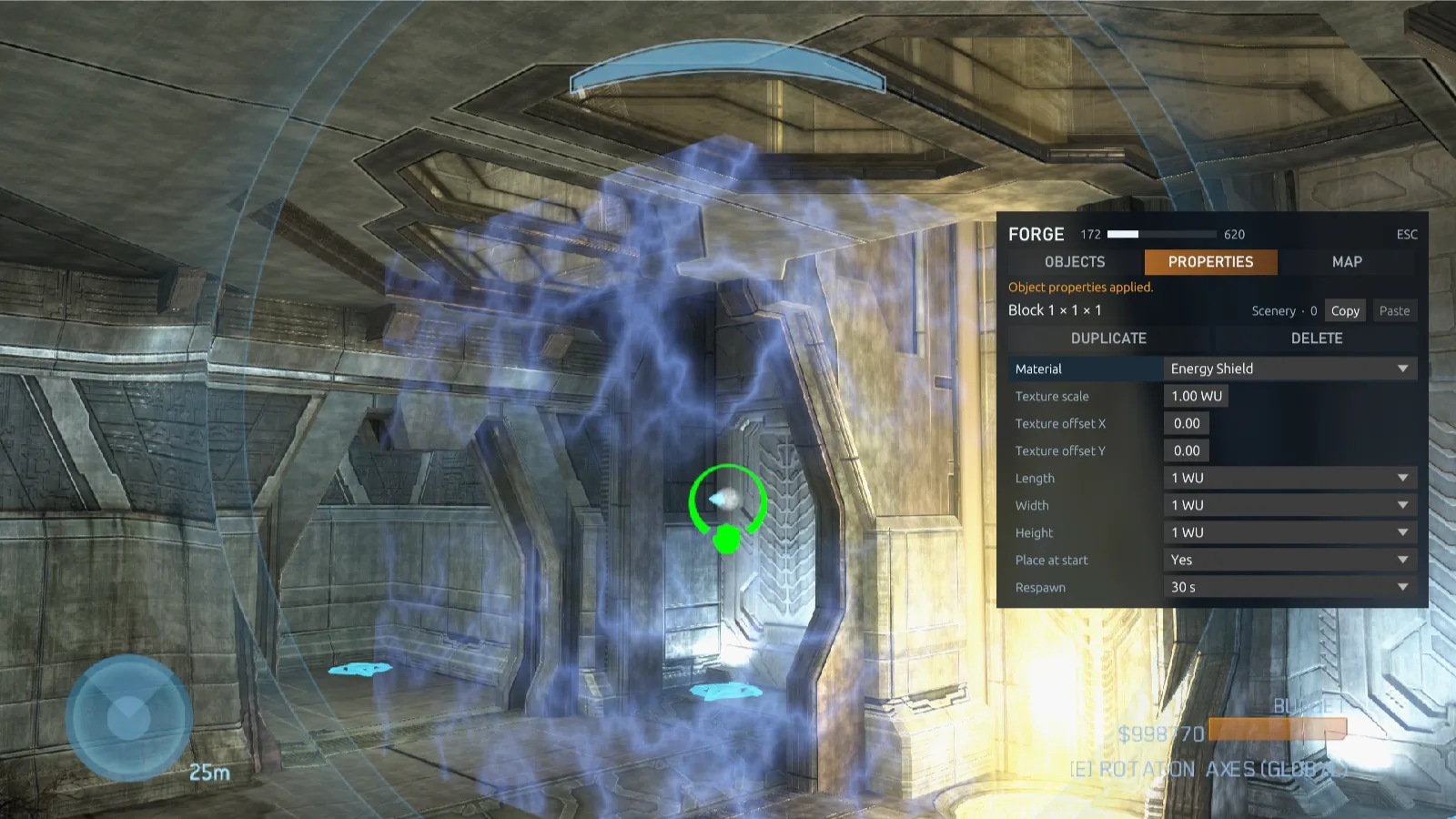
The title says what the tab works on. Under the tabs, the line reads how many objects the map holds, such as 331 OF 9,999 OBJECTS. The box under the rows explains the lit row, and the keys of the device you used last run along the bottom. Tab moves between the four tabs, LB and RB on a controller. On a dropdown such as CATEGORY or FROM, ← and → step to the entry before or after without opening it, and Enter or a click opens the list to pick any entry directly. PROPERTIES is there only while you hold or aim at an object.
Objects
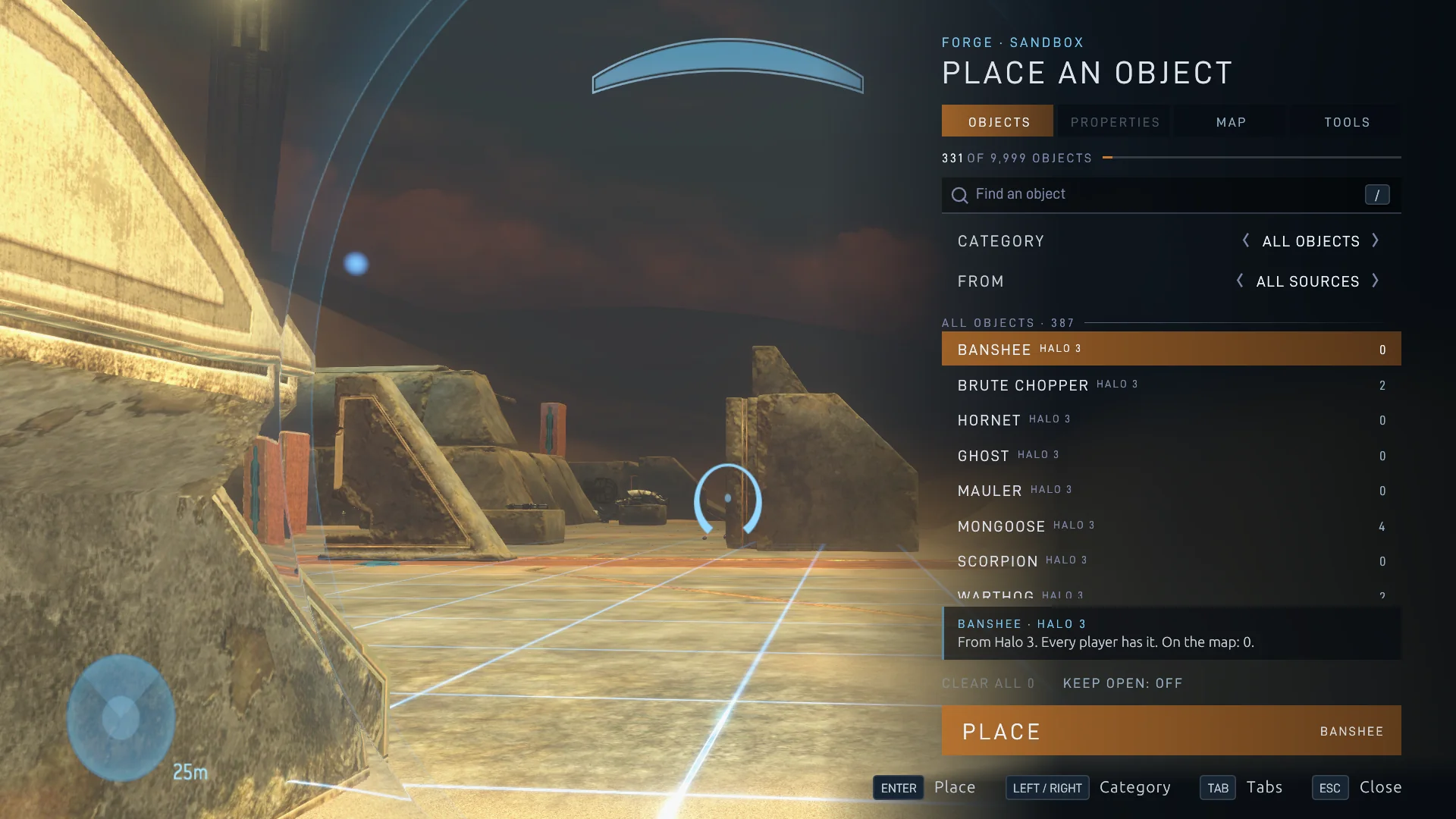
The title reads PLACE AN OBJECT. Start typing to search, or press /. CATEGORY runs through All objects, Vehicles, Weapons, Equipment, Scenery, Teleporters, Goals, Spawning, Primitives and AI, and FROM through the sources. Search also finds objects by their mod's name, and ODST's by "odst". Each row shows where the object comes from and how many are placed, and the objects you placed lately sit above the list, with the one you copied.
PLACE (Enter, or a double click) puts the object in the monitor's hands and closes the menu; KEEP OPEN (Ctrl+K, Cmd+K on macOS) stays. CLEAR ALL removes every placement of the chosen object, after a second press to confirm. When an object can't be placed, the box under the list says why, in gold.
Properties
Press 2 to edit the object you hold, or the one you aim at without picking it up. X always opens Objects, even while you aim at an object. Rows include a primitive's material, texture and size, place at start, respawn time (Never, each second from one to ten, or the longer times), symmetry, physics (Normal: it falls and gets knocked around; Fixed: it stays exactly where you let go; Phased: it stays put and may stand inside other objects and the ground), the game types it appears in, passthrough and team barriers, team, spare clips, a teleporter's channel and what it takes, a device's channel, a light's or screen effect's look, spawn order and zone shape and size. Then come where it stands, how it turns and, under While a game runs, its Run-time minimum and Run-time maximum. Every change applies as you make it.
- DUPLICATE (D) makes a copy with the same properties and rotation. A copy of an object you aren't holding stands beside the original, and you hold it. While you hold the object, it's set down where it hangs and its copy, turned the same way, comes straight into your hold. DUPLICATE is greyed out only when a copy can't be made, such as at the object's limit or when the map is full.
- COPY and PASTE (C and V) copy properties between objects of the same category.
- DELETE (Delete) removes the object straight away.
- MOVE HERE shows for switches and devices that can't be held.
- A selected group takes edits live: shared properties, primitive materials and position offsets apply to every object in it.
The host can give a placed object a Label and a Spawn sequence under Megalo scripting in this tab, for Megalo scripts to find it by: choose Apply scripting, then save the map. Several objects can share a label, and the sequence tells them apart. Players see the values, and only the host edits them. A labelled object is sent to every player like an object that moves.
Map
Under The map: the map's boundaries, sky and gravity and atmosphere. Under The monitor: where your monitor is, how fast it flies, and Teleport To fields. Under On the map: how many kinds and placements each category holds. Choose one to see its objects. Only the host can change the map's rows; other editors see the host's choices.
Tools
History, the selection, copies, magnets, Select distance and Selected objects, the host's Fly through walls, the host's Respawn and Pause game rules, prefabs, the host's Reset objects, and Clear map with its two stronger forms. The title says how many objects are selected. Forge tools in Settings → Keyboard & Mouse can open this tab from a key of its own.
Precise rotation
- Hold the right mouse button and move the mouse to turn the held object instead of the view. With a controller, hold RT and move the look stick. The object settles at its new angle quickly, keeps where you grabbed it, and your view stays where it was: the object turns in front of it. Let go mid-turn and it stands at the angle you turned it to.
- Rotation snap makes turns jump in steps of 5°, 15°, 30°, 45° or 90°, or is off. → and ← step it up and down, holding an object or not. While objects are selected and your hands are empty, → is Clear selection's instead. With snap on, each flick of the mouse or stick turns the object one smooth step; let the input rest to turn it again.
- Under Transform, choose Axes: Map for absolute Yaw, Pitch and Roll angles in degrees. With Axes: Object, the rows become Turn about up, left and forward: each applies a turn about the object's own axis. Reset rotation stands the object upright.
- The middle mouse button or ↑ stands the held object upright again. With a controller, press D-pad up while you hold it.
- Typed angles and upright turns land exactly: once you let go, the object stands at those angles, where it stood, for everyone.
- Turns go around the map's axes (GLOBAL), the ones nearest your view's. Switch rotation axes (R by default) switches between the map's axes and the object's own axes (LOCAL), and the HUD names the current ones. Snapped turns follow the same choice: under the object's own axes, a quick turn goes about the axes of the angle you're turning it to, and picking the object up again or changing the snap steps from its own orientation instead of squaring it to the map. On a controller, give Switch rotation axes a button in Settings → Controller.
- The Properties tab's turn and move rows, and a primitive's size rows, start from where a held object is going, not from where it is on its way there.
Rotation mode
Under Axes: Map, the Rotation mode row shows and takes an object's rotation the way Blender's Transform panel does: Quaternion (WXYZ), Euler angles in any of six orders (XYZ Euler to ZYX Euler) or Axis Angle, besides the game's own Yaw, Pitch, Roll. The rows below it become that mode's numbers, the ones Blender shows for the same pose: type one, or step it with ← and →. The choice lasts the session. The Reclaimer Kit has the same choice, Rotation mode under Transform.
Move to coordinates
Under Transform, choose Axes: Map to show Position X, Position Y and Position Z, in the same world units as your monitor's position in the Map tab. Type new ones to put the object exactly there. With Axes: Object, the rows become Forward, Left and Up: type or step a distance to move that far along the object's own axis from where it now stands. The choice follows the same Switch rotation axes control as held-object turns.
- Open its propertiesAim at the object, or pick it up, and press 2.
- Set the coordinatesType in Position X, Y and Z, each from −5,000 to 5,000, or step the chosen one by 0.1 with ← and →. Nothing moves while you type. Where it stands now fills in where the object stands.
- Move itPress Enter in a field, or select Move to X, Y, Z. The object goes there, turned as it is.
Hold, push and pull
An object you grab keeps its place and rotation while you stand still, until you move or turn it. It's held as if its physics were Phased, so walls and other objects can't push or turn it, and it can pass into them; when you let go, it takes back the physics chosen in its Properties. An object let go of inside a wall with Normal physics can be pushed out, a heavy vehicle such as the Elephant with great force, so place large vehicles in open space.
Grabbing keeps your camera where it was and holds the point you aimed at. Aim near the corner of a large object to line that corner up, without the view jumping to the object's center.
Halo 3 holds an object at most 10 units away, which puts the view inside anything large. Here you can hold it up to 100 units away, and pull it in to 0.1 units.
- Scroll the mouse wheel up to push the held object away and down to pull it closer. Each notch moves it a fifth of its distance, and at least one unit, so it goes far quickly. The object gets there in about a tenth of a second, even while you turn the view or fly, so you can zoom and orbit at once. Smooth-scrolling and high-resolution wheels and touchpads push too, and a push stops with the wheel.
- Combat Evolved's and Halo 2's weapons, vehicles and scenery move as smoothly and as fast as Halo 3's while you hold them.
- For fine moves, hold the right mouse button and move forward or back. With a controller, hold RT and push the left stick.
- Push object away and Pull object closer can also go on keys in Settings → Keyboard & Mouse; a held key moves the object steadily.
- The view stays behind the object as it moves, and it works the same for the host and for everyone editing with them.
Monitor speed and teleport
The monitor normally flies 2.5 world units a second. On a big map you can make it faster, and for fine work slower.
- Change speed: F (with a controller, click the left stick) cycles eight speeds: ×0.001 for precision work, ×0.05, ×0.25, ×1 normal, ×2, ×4, ×8 and ×16. Holding Move faster (Shift) and turning the mouse wheel steps through the same speeds, stopping at the slowest and the fastest. The middle of the screen shows the new speed for a moment, the speed stays until you change it, and Move faster's own boost still adds to it.
- Teleport: open the Forge menu's Map tab. Under The monitor, type Teleport to X, Y and Z (each from −5,000 to 5,000) and select Teleport, or press Enter in a field. The monitor moves there through anything in the way. Fill in where it is fills in where you are now, so you can note a spot and come back to it.
- Stopping: letting go of the movement keys brings the monitor to a quick, smooth stop instead of letting it drift on.
- Each editor flies at their own speed.
Monitors and game options
- Invincible monitors: nothing you build, throw or knock over kills you while editing. The host, or you when you edit alone, can switch this with INVINCIBLE MONITORS in the game menu; dedicated servers keep it on. Players in player mode take damage as usual.
- Start a new round: the host, or you when you edit alone, can choose START NEW ROUND in the game menu (Esc) to start the round again and reset the world, with your edits kept, for example to try a layout from the first spawn. It closes the game menu as the round starts. Save the map before you leave to keep the edits for another session.
- Every key rebindable: all Forge keys, like every other control, can be changed in Settings → Keyboard & Mouse, with two keys per action, and every controller button in Settings → Controller.
- World settings: Game Options → WORLD & FORGE sets sprint, player size from 25% to 300%, exposure and fog for any game.
- Forge's own options: the Forge game type's options have Halo 3's Allow editing (Everyone or Host only) and EDITORS traits for players in edit mode.
- Theater: Forge sessions and games on maps built in Forge are recorded as films for THEATER on the main menu, big maps included.
Controls
These are the defaults. They follow ElDewrito 0.6, and they apply only to the monitor: playing as a Spartan or Elite in Forge keeps the normal controls. Change any of them in Settings → Keyboard & Mouse, or the controller's in Settings → Controller.
As the monitor
| Key | Action |
|---|---|
| ` | Switch between playing and editing |
| X | Open the Forge menu on Objects |
| 2 | Open the Properties of the held object, or the one under the crosshair |
| W A S D | Fly where you look |
| E / Q | Fly straight up / down |
| Shift | Move faster |
| F | Cycle the monitor's eight speeds, from ×0.001 to ×16 |
| Space | Grab or drop the object under the crosshair |
| Right mouse + mouse | Rotate the held object |
| → / ← | Rotation snap larger / smaller (larger only with an object held or nothing selected) |
| R | Switch the rotation axes between the map's (GLOBAL) and the object's own (LOCAL) |
| Mouse wheel | Push the held object away / pull it closer |
| Middle mouse or ↑ | Stand the held object upright |
| C | Clone the object under the crosshair beside the face you aim at, or the whole selection; with nothing under the crosshair, copy the selection in front of you and hold it |
| Delete or Backspace | Delete the held object, or the one under the crosshair, or the whole selection |
| Left mouse | Select or deselect the object under the crosshair; start over empty space and sweep to select many |
| → held, hands empty | Clear the selection |
| M | Magnets off / on |
| Ctrl+Z / Ctrl+X | Undo / redo |
In the Forge menu
| Key | Action |
|---|---|
| Tab / Shift+Tab | Next / previous tab |
| ↑ ↓ | Choose an object or a row |
| ← → | Change a value, or step a dropdown such as the object category without opening it |
| Enter | Place the chosen object, or act on the chosen row |
| / | Find an object (or just start typing, on Objects) |
| Ctrl+K (Cmd+K on macOS) | Keep the menu open after placing |
| D | Duplicate (Properties) |
| C / V | Copy / paste properties (Properties) |
| Delete | Delete the object (Properties), or clear all of the chosen object (Objects) |
| Esc, X or 2 | Close the menu |
With a controller
The controller follows ElDewrito's Forge layout. Playing as a Spartan or Elite in Forge keeps the normal controls.
| Button | Action |
|---|---|
| D-pad up | Switch between playing and editing, with empty hands |
| X | Open the Forge menu on Objects. In it, the D-pad moves, A selects, B closes it, and RB / LB change tabs. |
| A | Grab or drop the object under the crosshair |
| B | Clone the object under the crosshair |
| Y | Delete the held object, or the one under the crosshair |
| RB / LB | Fly straight up / down |
| LT | Move faster |
| Left stick click | Cycle the monitor's speed |
| RT, hands empty | Select or deselect the object under the crosshair |
| RT held + look stick | Rotate the held object |
| RT held + left stick | Push the held object away / pull it closer |
| D-pad up, holding an object | Stand the held object upright |
| D-pad right / left | Rotation snap larger / smaller (larger only with an object held or nothing selected) |
| D-pad right held, hands empty | Clear the selection |
| D-pad down | Magnets off / on |
| Right stick click | Zoom |
Object properties and Switch rotation axes have no button by default. Give them one in Settings → Controller, or reach Properties from the menu with RB.
Mod objects
Mod maps give their Forge objects too, for the games you choose. A mod's objects aren't in the palette until you ask for them.
- Have the modPut it in your Mods folder, or subscribe in the Steam Workshop, and leave it turned on in Settings → Mods. Its row there says how its Forge objects stand. Its shelf builds in the background.
- Turn it on for this gameIn a Forge lobby's HOST SETTINGS, under FORGE OBJECTS, turn on the mod's row. It applies to the next game.
- Find its objectsIn the Forge menu, set FROM to the mod, or search for its name. Its objects are tagged with its title, in gold.
- A saved map remembers which mod each object came from, works in every game type, and plays with those objects even if the mod is turned off on this PC.
- Each mod you turn on becomes one of the game's required mods. Players who join download it from you, with Share mod files on, or from the Steam Workshop, and need nothing from your other mods.
- A game can ask players for up to 16 mods. Past that, FORGE OBJECTS warns you, and the rest reach players only as objects packs, with sharing on.
- A mod's objects can be turned on for every game's maps, Halo: Combat Evolved's and Halo 2's included, the same way.
- The seats a mod adds for its own vehicles (pilot, gunner and troop seats) work on any map its objects are placed on, with several mods on at once, and for Halo: Reach's, Combat Evolved's and Halo 2's players on their own maps too.
- To host such a map on a dedicated server, put the mods in
content/Modsand turn on sharing. See mods on a dedicated server. - ODST's mods give no Forge objects yet.
Forge on a mod map
Forge works on a mod map as on any other. It offers the mod's own objects, always, plus Halo 3's objects from every installed multiplayer map, primitives and kill and garbage volumes. A map you compile in the Reclaimer Kit is a mod map too.
- Pick the mod mapIn a Forge lobby, choose it under MAP.
- Build and saveAs on any map. The saved map keeps the objects it places in every game type.
- Play itMaps saved on a mod map are listed beside that map in the picker, including maps other players shared and maps you saved on someone else's server. Players who join need the mod, and their game makes the same map from their copy.
An object's Properties follow what it is rather than where the mod lists it, so teleporters listed under Scenery have their channel. Objects a host places after a player has joined show in that player's Forge menu too, and a late joiner who saves keeps every object in the map.
ElDewrito maps
ElDewrito's Forge maps and game variants convert themselves into Forge maps and game types of your own. There's nothing to run.
- Put the files inCopy ElDewrito Forge maps (
sandbox.map, usually in a folder named after the map) and game variants (variant.slayer,variant.zombiez,variant.ctfand so on) into theMapsorGame Modesfolder of your player folder. Either folder takes either, and subfolders are fine. - Start the game, or choose RefreshThe game converts them when it starts, or when you choose REFRESH in the lobby's map or game type picker. Each map becomes a Forge map in
Mapsand each game variant a game type inGame Modes, under its own name. - Play or editPick the map in a lobby like any saved Forge map, with any game type, or open it in Forge to keep building.
Each file is deleted once it's converted, with any folder it leaves empty, so it's converted only once. Keep a copy elsewhere if you still want it for ElDewrito.
What a conversion keeps
- Reforge pieces become primitives of the same shape and size, where they stood, and Invisible, shield and glass pieces get ours. Each of ElDewrito's other materials becomes the nearest of the other maps' materials by kind and look: its default grid is drawn in plain grey, and grass, leaves and forest floor, which no map offers on a block, become dirt. Colored Glossy, Matte, Glass Colored and Glass Emissive pieces keep their color.
- Objects MCC also has are placed where they were; objects it has no match for are left out.
- Game objects: spawn points, flags, bombs, hills, territories and teleporters keep their game types and teams, and vehicle teleporters keep taking vehicles. Kill and garbage volumes become kill and garbage volumes here, with their options: always visible, destroying vehicles, killing as the Guardians (ElDewrito's falling counts as a plain death), what a garbage volume removes, objectives included, and after how long.
- Lights and screen effects: ElDewrito's lights become Lights with the nearest of the 24 colors, the same reach and cone, and their pulse or flicker. ElDewrito's screen FX become Screen Effects with the nearest look and strength, in a sphere that reaches as far as theirs did, seen by the same team.
- Map settings: the map modifier's barrier settings carry over to the Map tab's boundaries, its gravity becomes the nearest Gravity and a map that hid its fog keeps it hidden. Its exposure, bloom, sky and weather are Halo Online's own and are left out.
- Still objects: pieces and scenery that never move, such as blocks, walls and rocks, stand as still objects, exactly where they stood.
- Game variants keep their mode, name, author and settings: scoring, rounds, respawning, traits and powerups. Starting weapons that only ElDewrito has are left as the map's.
Objects that move can also take the slots of the base map's own objects that the ElDewrito map deleted (see the map's own objects).
A file that can't be converted stays where it is. Its base map isn't one MCC has, it needs an ElDewrito mod, it has more than 5,000 objects that never move, or it has more objects that move than the base map's first 640 slots have room for. client.log, in the Logs folder of your player folder, says why, and for every converted file what it left out.
ElDewrito's Forge tools
Nearly everything ElDewrito added to Forge is here too, so its builders can work the way they're used to:
| ElDewrito | Here |
|---|---|
| Selection, group moves, clone multiplier and depth | Left mouse, → held, carry a selected object, Copies and Spacing; see selection |
| Deselect a kind, copies at the crosshair, outline or box renderer | Deselect all of this kind, C over empty space and Selected objects |
| Prefabs and Canvas | Tools tab prefabs, with their object count, author and date, and Clear map |
| Reset runtime | The host's Reset objects |
| Magnets | M and Snap within; see magnets |
| Undo and redo (0.7) | Ctrl+Z / Ctrl+X; see undo |
| Monitor controls (0.6) | The same default keys and controller buttons; see controls |
| Reforge material color | Material color on every primitive |
| Reforge material catalogue and picker | Other maps' materials, in a picker with pictures, categories, Recent and search |
| Monitor noclip | Fly through walls (host) |
| Gametypes list | Game types row |
| Kill volumes that destroy vehicles or count as the Guardians | The kill volume's Destroys vehicles and Killed by rows |
| Garbage volumes that send objectives back | The garbage volume's Objectives row |
| Respawn points tinted by team | Team starting and respawn points drawn in the team's color |
| Map modifier: barriers, gravity, skybox, camera effects, fog, sky transform | Map tab boundaries, Sky and gravity and atmosphere |
| Forge lights and screen FX | Lights and screen effects, with preset colors and looks |
| Team barriers (0.7) | Players of a team |
| Vehicle teleporters | Takes players and Takes vehicles |
| Devices and power channels (0.7) | Doors and switches on channels 1 to 31 |
Not here yet: fog color and weather, the prematch camera, and 0.7's climbable surfaces and physics materials.
Forge and the Reclaimer Kit
The Reclaimer Kit, an app of its own, is the game's map editor. It shares Forge's palette, properties, primitives, materials, volumes and AI spawners, but you work in a different way and make a different thing.
- Use Forge to build in the game as the monitor, live with friends, and save a map variant on an existing map.
- Use the Kit to change the map itself: its own placements, scenario lights, decals, tags and scripts. It makes a new map in a mod package.
- Use both. A map compiled in the Kit plays in Forge like any mod map, and prefabs saved in either one show up in the other, turned the same way. The Kit also opens the maps you save in Forge, and campaign canvases, and saves a scene back as a Forge map that the menus list for Forge and custom games.
Forge or the Kit? compares the two side by side.
Known limits
- Campaign canvases other than ODST's stay out of playlists and dedicated servers: play them from your own HOST GAME lobby. Halo 2's play by Halo 3's game rules, and Reach's have no picture yet.
- Prefabs across maps: a prefab is meant to place on any map that has its objects, but placing one saved on another map hasn't been tried yet. Check the result before you build on it.
- MCC map variants (
.mvarand.binfiles) are read with the engine's own readers, but no real file has been played yet. - Very big games: see what a big map costs.
- Mod maps on servers: a server's or playlist's
variantsaved on a mod map doesn't find that map yet.